
Project and Pipeline Ownership
Every Builders project has one ownership scope: a user or a team. Pipelines do not choose a separate owner. They belong to a project and inherit the project's access context, resource visibility, usage context, and team permissions.
Read the ownership hierarchy
Use this hierarchy when deciding who can open an automation and which dependencies it can use:
user or team owner
-> project
-> pipeline
-> saved and published versions
-> workflow runs
| Entity | Ownership behavior |
|---|---|
| Project | Stores the Owner type and Owner that define the workspace boundary |
| Pipeline | Belongs to one project and inherits that project's owner scope |
| Workflow version | Belongs to its pipeline; publishing does not create a separate owner |
| Run | Executes a pipeline version in the owning project's context |
| Reusable resource | Has its own user or team owner and must be compatible with the project scope |
Ownership and role are separate. Ownership determines the workspace and compatible resources. A team role determines which actions a member may perform inside that workspace.
Identify the project owner
The Projects list exposes the owner at a glance:
- Owner type is
userfor a personal project orteamfor a team project. - Owner identifies the user scope or the owning team.
- Pipelines counts the pipelines that inherit this project context.
Open the project's settings to inspect the authoritative ownership fields. Project name can be edited independently, while Owner type and Owner are read-only. Builders uses the separate Change ownership action for an ownership transition.
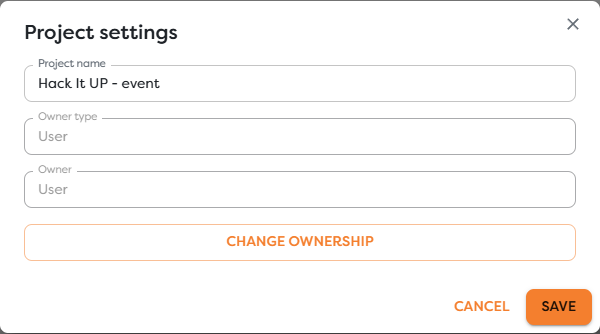
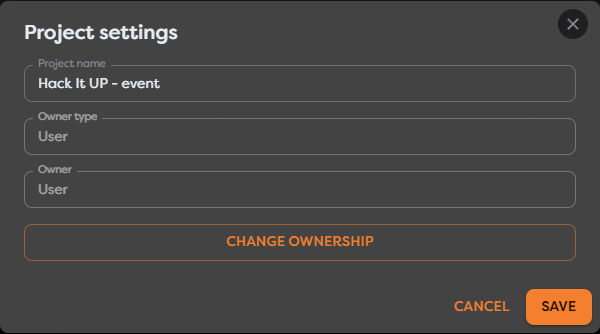
Changing a display name does not change ownership. A project named after a team is still personal when its Owner type is User, and a team project remains team-owned when it is renamed.
Understand personal and team ownership
| Project scope | Owner | Who can access it | Compatible reusable resources |
|---|---|---|---|
| Personal | One Builders user | The owning user | Resources owned by that user |
| Team | One team with Builders access | Eligible team members, according to role | Resources owned by that same team |
A team name is an ownership boundary, not a folder label. Membership in one team does not grant access to projects or resources owned by another team.
For a team project, access requires all of the following:
- The account belongs to the owning team in the main Boilerplate Team workspace.
- The team has access to Builders.
- The member's Builders role permits the requested action.
- The project and selected resources use compatible owner scopes.
Understand pipeline membership
Pipeline settings contain the pipeline name, description, and Move to project action. They do not contain independent Owner type or Owner fields.
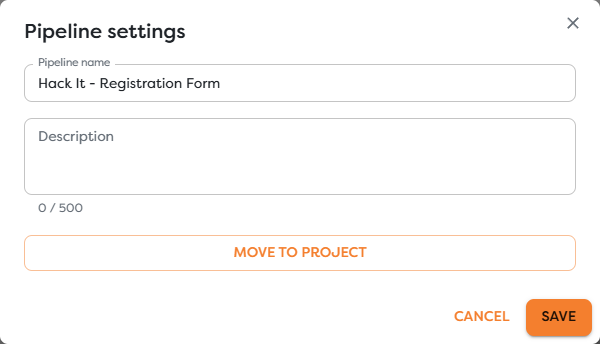
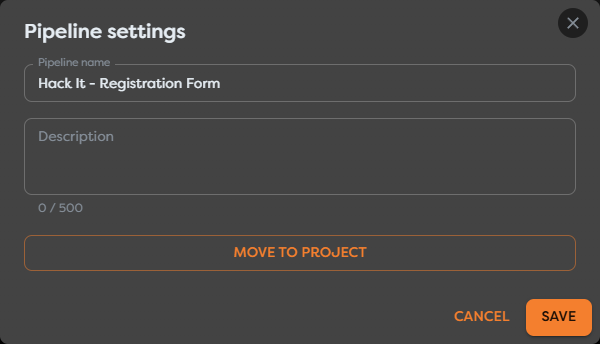
This distinction matters:
- renaming a pipeline or editing its description does not affect ownership;
- creating a pipeline inside a project places it in that project's scope;
- moving a pipeline to another project changes the scope it inherits;
- changing the owner of the containing project changes the scope inherited by every pipeline in it.
The pipeline ID identifies the pipeline independently of its display name. Use the ID when correlating runs, API operations, and diagnostic records, but use the containing project to determine ownership.
Keep creator identity separate from ownership
The account that creates or edits a project, pipeline, version, or run can appear in activity and audit records. That identity describes who performed an action; it does not create a second ownership scope.
For example, when a Designer creates a pipeline inside a team project:
- the Designer is the creator of that action;
- the pipeline belongs to the team project's context;
- other eligible team members can work with it according to their roles;
- the pipeline cannot use the Designer's private integrations, Vault entries, databases, AI agents, or Static Drive files.
Do not treat a creator name, project name, or pipeline name as proof of ownership. Check the project's Owner type and Owner.
Follow ownership during execution
The project owner affects more than visibility:
| Area | Ownership effect |
|---|---|
| Workflow access | Determines whether the project is personal or available through a team workspace |
| Integrations and data | Filters integrations, General Vault entries, database connections, AI agents, and Static Drive resources offered to the pipeline |
| Permissions | Applies the owning team's role matrix to project, pipeline, Designer, run, and resource actions |
| Budget | Workflow execution consumes the applicable personal or team compute-token balance |
| Storage and limits | Project, pipeline, storage, and execution limits are evaluated for the applicable owner context |
| Published execution | Published versions continue to execute as part of their pipeline and project, not as detached copies |
A healthy credential is not enough when it belongs to the wrong scope. Builders first checks whether the project may see the resource; the external provider then checks what the selected credential may do.
Recognize ownership-sensitive actions
Ordinary editing and ownership transfer use different permissions:
- a Designer can create, edit, and delete pipelines in a team project but cannot create, edit, delete, or transfer the project;
- a Team Leader can create, edit, and delete team projects and pipelines but cannot transfer them;
- only the Team Owner can transfer a team project or pipeline;
- the owner of a personal project can use the supported ownership actions for that project and its pipelines.
Moving a pipeline and changing a project owner can invalidate resource references. Builders may remove references that are unavailable in the destination scope. Prepare destination resources and test the workflow before treating either action as an administrative rename.
Troubleshoot ownership confusion
- The project name suggests a team, but resources are personal: open Project settings and inspect Owner type rather than relying on the name.
- A team member cannot see the project: confirm team membership, team access to Builders, and the project's actual owner.
- A pipeline has no owner field: this is expected; open its containing project's settings.
- A personal integration is missing from a team pipeline: create or select an approved integration owned by the same team.
- Change ownership is unavailable: a team transfer requires Team Owner permission; ordinary project editing is not sufficient.
- Move to project is unavailable: pipeline transfer requires the personal owner or Team Owner permission for the current project scope.
- An action is allowed but the workflow fails: check destination resource references, provider permissions, current budget, storage, and execution limits.
- An audit record names a different user: treat it as the actor for that event, then verify ownership from Project settings.