
Subflow
Use Subflow to run a published pipeline as part of the current workflow. It creates an explicit composition boundary when a reusable process has its own diagram, version, ownership, and test surface.
The target must be a pipeline in the same project with a Manual Trigger and a published version.


Prepare the child pipeline
Before configuring Subflow:
- Create the child pipeline in the same project as the parent.
- Add a Manual Trigger as its entry point.
- Build and test the child with representative input.
- Save the child version.
- Publish the exact version the parent should call.
Only eligible published pipelines appear in the selector. A draft-only child or a pipeline from another project is not a selectable target.
Configure Subflow
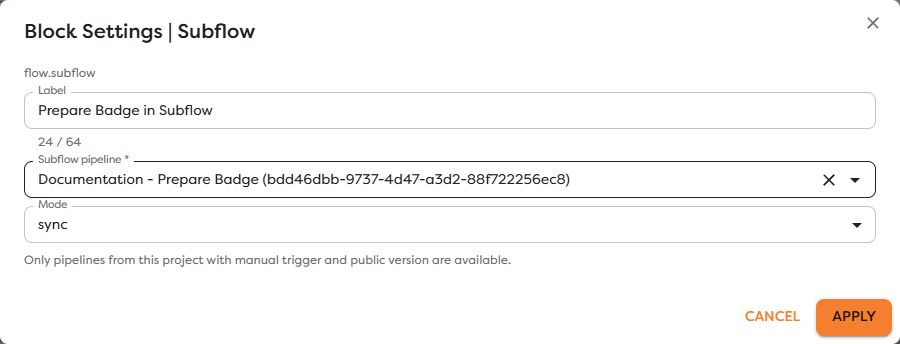
Add Subflow from the Flow category and set:
| Field | Purpose |
|---|---|
| Label | Describes the delegated operation, such as Prepare Badge in Subflow. |
| Subflow pipeline | Selects the eligible child pipeline in the current project. |
| Mode | Chooses synchronous (sync) or asynchronous (async) execution. |
The selected target is stored by pipeline ID. Renaming the child does not intentionally change that identity, but review parent diagrams after reorganizing pipelines so labels remain understandable.
Pass input to the child
When the parent path reaches Subflow, its current input becomes the child invocation input. Design the child's Manual Trigger path and first processing step around an explicit contract, for example:
{
"registration": {
"attendeeName": "Ada Lovelace",
"attendeeEmail": "ada@example.com"
}
}
Normalize the payload before Subflow when several parent paths use different source schemas. The child should not need provider-specific assumptions when its responsibility is reusable badge preparation.
Treat the child result as the Subflow result available to the parent's downstream path. Inspect a controlled parent run before writing nested expressions against that result.
Choose the execution mode
| Mode | Use it when |
|---|---|
sync | The parent must wait for the child to finish and continue with its result. |
async | The parent should dispatch the child without waiting for its completed business result. |
Use synchronous mode when a later parent block requires the generated badge data. Use asynchronous mode for independent work where the parent only needs successful dispatch semantics.
Do not use asynchronous mode and then assume the next parent block can read a completed child result. Correlate asynchronous work with stable run and business identifiers and inspect the child run separately.
Version and publication behavior
Subflow calls the target's published version, not an arbitrary unsaved child draft. Updating the child draft does not change parent behavior until the intended child version is saved, tested, and published.
Publishing a different child version changes future calls without editing the parent block. Treat that as a dependency release: test the child contract and at least one parent run before and after changing the published version.
Prevent recursion
Do not create direct or indirect cycles such as pipeline A calling B while B calls A. Also avoid a child calling itself. Recursive composition can create non-terminating run chains, repeated side effects, and rapidly increasing usage.
Document the parent-to-child dependency in both pipeline descriptions or team release notes when several workflows rely on the same child.
Test a Subflow
- Test and publish the child version first.
- Save the parent version with the selected target and mode.
- Start the parent's controlled trigger path.
- Confirm that a child run is created with the expected input.
- For synchronous mode, verify that the parent continues only after child completion.
- Inspect the Subflow output and the first downstream parent input.
- Repeat the test for child failure and timeout behavior relevant to the workflow.
Designer tests can execute the published child and its real side effects. Use controlled resources in both pipelines.
Troubleshoot Subflow
- The child is absent from the selector: confirm that it is in the same project, has a Manual Trigger, and has a published version.
- The child uses an older definition: check which child version is currently published.
- The child receives the wrong shape: add a Transform before Subflow and verify the parent block's complete input.
- The parent continues too early: use synchronous mode when downstream work needs the completed child result.
- An asynchronous result is difficult to trace: preserve a correlation ID and inspect the child run independently.
- Runs repeat without terminating: inspect the dependency chain for direct or indirect recursion and unpublish the unsafe version.
- The child cannot access a resource: verify integration, database, Vault, and ownership access from the child's project context.