
Web Request
Use Web Request to call an HTTP or HTTPS endpoint from a workflow. The block supports common methods, query parameters, headers, several body formats, file attachment sources, redirects, timeouts, and bounded retries.
Configure the request
Add Web Request from the Process category and configure:
| Field | Purpose |
|---|---|
| URL | Required absolute http:// or https:// endpoint. Template expressions can supply path values. |
| Method | GET, POST, PUT, PATCH, DELETE, or HEAD. |
| Timeout (ms) | Positive request deadline. |
| Retry count | Number of additional attempts after a retryable failure. |
| Retry delay (ms) | Delay between attempts. |
| Body mode | none, json, raw, xml, urlencoded, or formdata. |
| Follow redirects | Controls whether redirects are followed automatically. |
| Headers | Repeated key-value request headers. |
| Query params | Repeated key-value URL query parameters. |
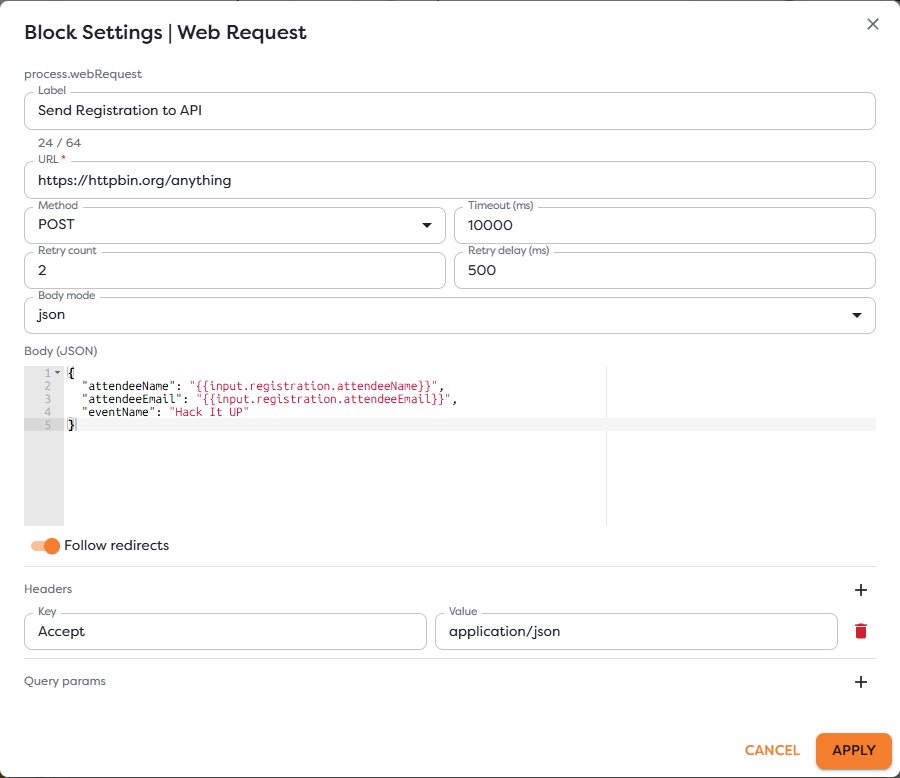
The event example uses POST, a 10-second timeout, two retries with a 500 ms delay, and a JSON body:
{
"attendeeName": "{{input.registration.attendeeName}}",
"attendeeEmail": "{{input.registration.attendeeEmail}}",
"eventName": "Hack It UP"
}
Set Accept: application/json when the workflow expects JSON. The block supplies the appropriate content type for structured body modes; add or override headers only when the target API requires it.
Choose a body mode
| Mode | Use it for |
|---|---|
none | GET, HEAD, or another request with no body. |
json | Structured JSON APIs. |
raw | Plain text or provider-specific payloads. |
xml | XML services. |
urlencoded | HTML-style form fields encoded in the request body. |
formdata | Multipart fields and optional file attachments. |
For multipart requests, file rows can source content from a URL, workflow context, Static Drive, an integration, or an uploaded file reference supported by the block. Give each part the exact field name expected by the API and verify size and media-type limits before production use.
Review MDN HTTP request methods and FormData for standard HTTP and multipart concepts. The target API's own documentation remains authoritative for its URL, authentication, body, and response contract.
Build URLs and headers safely
Use query rows for query values instead of manually joining ? and &. Encode dynamic path segments according to the target API contract. Never let untrusted input replace the URL scheme or host unless the workflow explicitly allows and validates that destination.
Keep API keys and tokens in supported integration or Vault fields. Do not expose them in labels, static templates, exported workflow schemas, screenshots, or logs. Avoid forwarding inbound Authorization, Cookie, or proxy headers to another host.
Understand outputs
Web Request exposes separate Out and Error paths.
- Out carries the successful request result and response data reported by the runtime.
- Error carries request failure information for a connected recovery or diagnostic path.
Connect Error when the workflow has a defined recovery action, alert, fallback, or safe failure record. Do not connect it to the same side effect without a retry limit and idempotency strategy.
Inspect the actual response body and metadata in a controlled run before writing expressions. A successful HTTP exchange can still contain a business-level error object, and some APIs legitimately return an empty body.
Configure retries deliberately
Retries can repeat an operation. GET and HEAD are normally intended to be safe, while POST and other writes can create duplicates unless the target supports idempotency.
Before retrying a write:
- Read the target API's retry guidance.
- Send a stable idempotency key when supported.
- Treat rate limits and retry hints according to the provider contract.
- Keep retry count and delay bounded.
- Confirm whether the block retries timeouts, connection errors, response codes, or a narrower documented set.
Do not assume that a timeout means the server performed no work. The server may have completed the request after the client stopped waiting.
Handle redirects and files
Automatic redirects can move a request to another host. Review redirect behavior before sending credentials or sensitive body data. Prefer the final documented HTTPS endpoint rather than relying on an avoidable redirect.
For files:
- validate size, media type, and ownership;
- use controlled URLs and integrations;
- avoid attaching secrets or unrelated workflow context;
- confirm that retries do not upload or create the same resource twice;
- inspect only redacted metadata in logs.
Test a request
- Use a controlled endpoint or sandbox account.
- Save the workflow version.
- Run representative success input.
- Inspect the resolved URL, method, response status, body, and block path.
- Test a validation error, authentication error, timeout, and server failure.
- Confirm that the Error path and retry behavior match the workflow policy.
- Verify any external side effect in the target system.
Troubleshoot Web Request
- The URL is rejected: provide an absolute HTTP or HTTPS URL and inspect resolved expressions.
- The API reports invalid JSON: validate Body JSON after template values resolve.
- Authentication fails: verify the supported integration or Vault value, header format, scope, and expiry without logging the secret.
- The API receives no fields: confirm the selected body mode and its content type.
- A file is missing: check its source type, reference, part name, access, and size limit.
- The block follows an unexpected host: disable redirects while diagnosing and use the documented final endpoint.
- A timeout creates a duplicate: add provider-supported idempotency before enabling another retry.
- A 2xx response contains an error: inspect the response body and add an explicit business-level condition.