
Test Runs, Output, Usage, and Errors
Test an AI Agent from the Designer with representative input, then inspect the AI block and every branch it can activate. The overall run status alone does not prove that the model step succeeded.
Read the run as a block-by-block trace
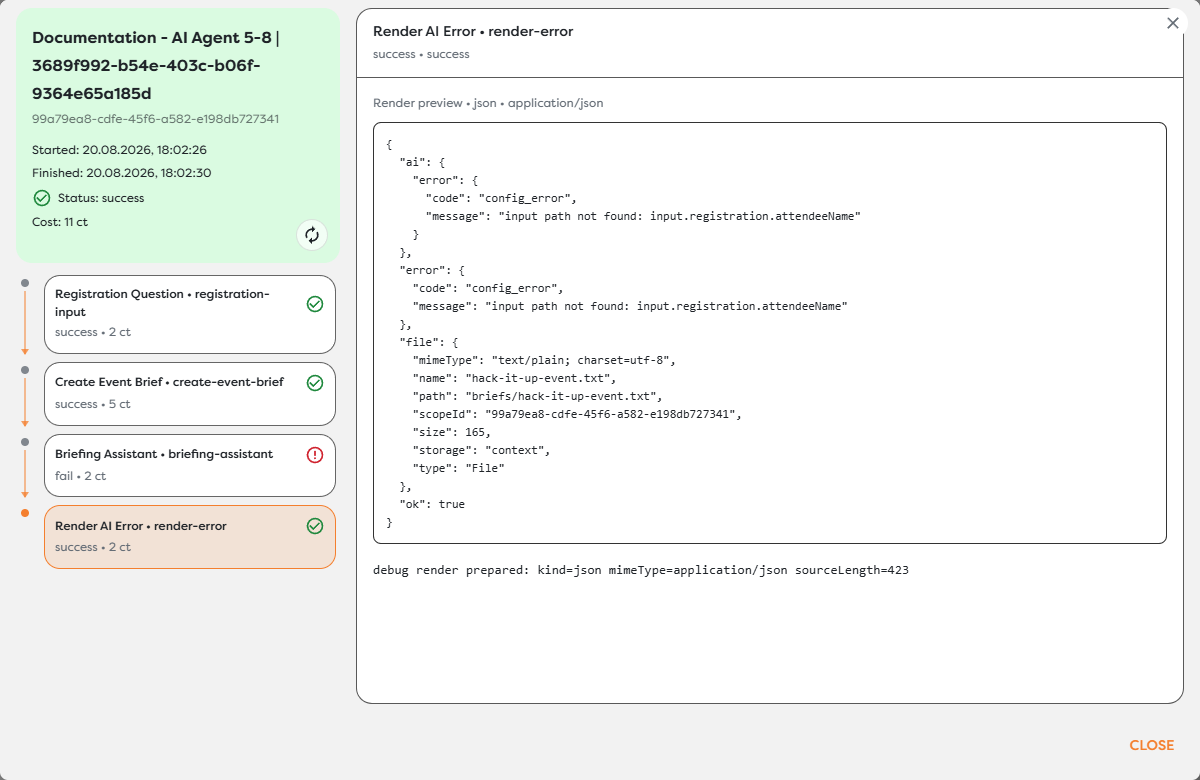
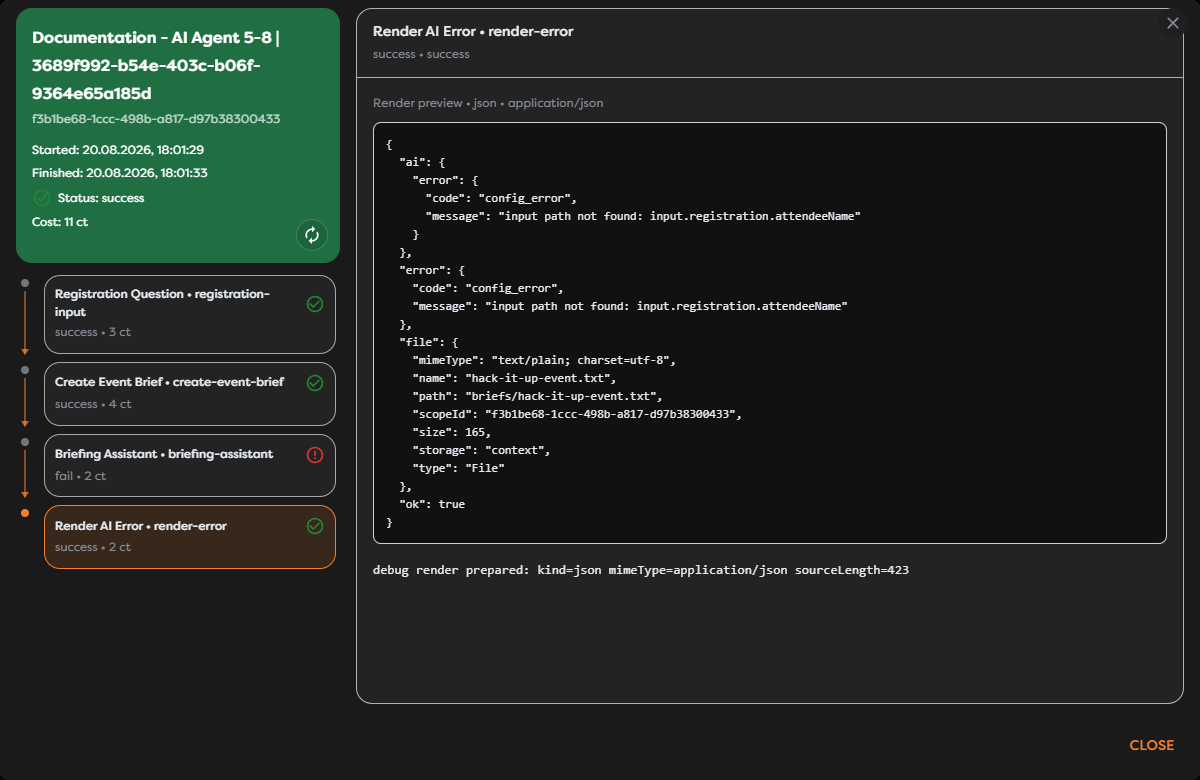
The run inspector shows start and finish times, overall status, total compute cost, each executed block, and the selected block's output or logs. Select the AI Agent itself to inspect provider metadata, tool calls, response content, usage details, and errors available for that execution.
The screenshot demonstrates an important behavior: Briefing Assistant failed with a config_error, its Error connection activated Render AI Error, and the overall workflow finished successfully because the error branch completed. The green run status therefore means the workflow handled its executed path; it does not mean every block used Out.
Inspect both AI Agent ports
| Port | Inspect | Verify downstream |
|---|---|---|
| Out | Generated text or structured data, provider and model metadata, tool results, and usage | The next block receives the exact shape and content it expects |
| Error | Error code, message, provider details, duration, and any partial context Builders exposes | Logging, fallback, alerting, or retry logic handles the failure deliberately |
For structured output, a provider can return text successfully while the AI Agent still follows Error because the response is not valid against the configured JSON Schema.
For tools, confirm both sides of the action: the run trace should show what the agent requested, and the external system should show the expected result. A successful model response is not sufficient evidence that an email, Drive write, Slack message, or issue update was correct.
Distinguish usage types
| Usage | Where it comes from | What to check |
|---|---|---|
Workflow compute tokens (ct) | Executed workflow blocks | Total run cost and the cost shown next to each block |
| Builders AI tokens | Platform premium AI source | Billing-owner balance and source details |
| Private provider usage | Provider credentials configured for a private or team AI agent | Provider usage metadata and the provider account |
| Free source AI usage | Builders Free AI | AI usage is free, but executed workflow blocks still consume compute tokens |
Do not treat ct as the model's prompt-token count. Workflow compute and AI-provider usage are different meters.
Test realistic input paths
Template expressions are resolved against the object that reaches the AI Agent's In port. An upstream processing or file block may replace the shape supplied by the trigger.
The screenshot shows this exact failure:
config_error: input path not found: input.registration.attendeeName
The trigger originally supplied registration data, but the AI Agent received the preceding File block's output. Fix this by explicitly preserving or merging the required registration fields, or by changing the prompt to reference the AI Agent's actual input. Do not hide the error with a fallback value unless missing data is genuinely acceptable.
Test every template path used by the prompt, conversation ID, attachments, tool configuration, and structured-output workflow.
Recognize common failure classes
| Failure | Typical cause | First check |
|---|---|---|
| Configuration or template error | Missing input, Vault, or run path | Inspect the preceding block output and rendered expression path |
| Provider error | Credentials, provider availability, rejected request, or empty response | Inspect provider, model, source status, and error metadata |
| Timeout | Provider or tool did not finish before the configured limit | Check duration, provider health, tool latency, and Advanced > Timeout |
| Memory error | Empty conversation ID or unavailable memory storage | Inspect the resolved ID and memory configuration |
| Attachment error | Non-canonical value, unsupported media mode, or more than five files | Inspect the incoming File object and selected model capabilities |
| Structured-output error | Response does not satisfy the JSON Schema | Inspect raw response details and tighten prompt/schema alignment |
| Tool or integration error | Tool disabled, integration unavailable, MCP disabled, bad arguments, or external rejection | Inspect tool-call logs, integration selection, and external permissions |
Build a useful test matrix
Before publishing, test:
- A normal input that should use
Out. - Missing and malformed values used by prompt templates.
- The largest realistic prompt and attachment set.
- Separate conversation IDs and repeated runs with the same ID when memory is enabled.
- Every enabled tool, including an external permission failure.
- A provider or timeout failure that should use
Error. - Valid and invalid structured responses when JSON Schema is enabled.
- A production-like AI source, because the free source is intended for interactive runs and its latency and behavior may differ from production.
Keep the error branch observable. Render the error during development, then send structured logs or alerts in production without exposing credentials, full private prompts, or unnecessary personal data.
Retry deliberately
Retry transient provider, network, or timeout failures only when the operation is safe to repeat. Limit retry count and preserve a stable correlation or idempotency key for side-effecting tools.
Do not blindly retry configuration errors, missing template paths, schema design errors, or an integration that requires MCP enablement. Those failures require a configuration change, not another identical execution.
An AI Agent can call a tool before a later timeout or provider failure is reported. Check the external system before retrying to avoid duplicate emails, messages, files, queue publications, or issue updates.
Verify before publishing
- The intended source and model are selected.
- All expressions resolve against the AI Agent's immediate input.
- Attachments use canonical Files and supported media modes.
- Conversation IDs isolate unrelated users and threads.
- Only required tools are enabled and their integrations are MCP-ready.
Outmatches the downstream contract.Erroris connected, observable, and tested.- Compute and provider usage are acceptable.
- External side effects are correct and repeat-safe.