
Integration Catalog and Status
The Builders catalog currently provides 20 integration types across six categories. Open Integrations, select Create, and use search to find a provider or capability.
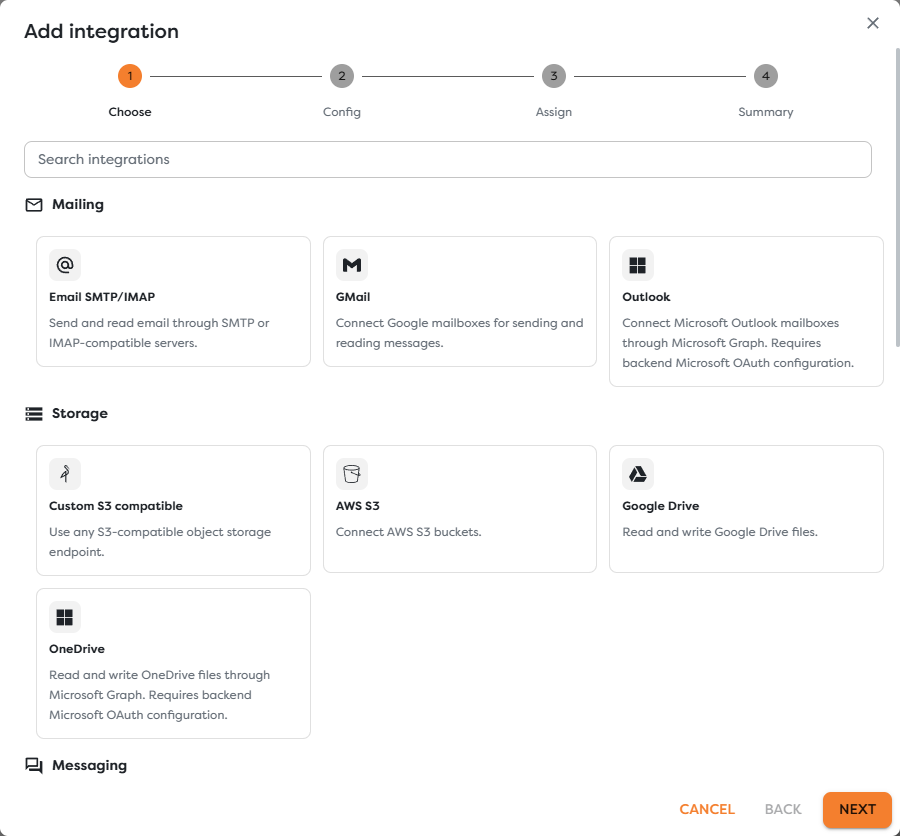
Mailing
| Integration | Purpose | External system |
|---|---|---|
| Email SMTP/IMAP | Send mail through SMTP and read a mailbox through IMAP | Any compatible mail server |
| GMail | Send and read Google mailboxes through Gmail API OAuth credentials | Google Workspace or Gmail |
| Outlook | Read, draft, delete, and send mailbox messages through Microsoft Graph | Microsoft 365 or Outlook.com |
SMTP and IMAP are enabled independently in the generic Email integration. Gmail and Outlook use provider-specific authorization and should be preferred when their API behavior or delegated permissions are required.
Storage
| Integration | Purpose | External system |
|---|---|---|
| Custom S3 compatible | Read and write objects through a custom S3 endpoint with path-style URL support | MinIO or another compatible service |
| AWS S3 | Read and write objects in an Amazon S3 bucket | Amazon Web Services |
| Google Drive | Read and write files authorized through Google Drive OAuth | Google Drive |
| OneDrive | List, read, write, remove, and create files or folders through Microsoft Graph | OneDrive or OneDrive for Business |
The Google Drive form defaults to the narrow drive.file scope. That scope can access files created, selected, opened, or explicitly shared with the app; it does not automatically expose every existing file in Drive.
Messaging
| Integration | Purpose | External system |
|---|---|---|
| Slack | Send, reply to, and read workspace messages; receive Events API callbacks | Slack |
| Microsoft Teams | Send, reply to, read, and trigger from channel or chat messages | Microsoft Teams through Graph |
| WhatsApp Business Platform | Send policy-eligible free-form messages, reply, use approved templates, mark inbound messages as read, and receive Cloud API webhooks | Meta WhatsApp Business Platform |
| Twilio SMS | Send and receive SMS using a number or Messaging Service | Twilio Programmable Messaging |
| Signal Messenger | Send, receive, reply to, and read messages through a self-hosted bridge | Signal through a compatible bridge such as signal-cli-rest-api |
Messaging integrations commonly require an outbound credential and an inbound callback registration. Saving valid API credentials is not enough for triggers; the provider must deliver events to the integration callback URL shown after the integration is saved.
Project Management
| Integration | Purpose | External system |
|---|---|---|
| Jira | Create, update, comment on, and receive issue activity | Jira Cloud |
| Github Issues | Create, update, comment on, and receive repository issue activity | GitHub Issues |
| Gitlab Issues | Create, update, comment on, and receive project issue activity | GitLab Issues |
Issue integrations combine API credentials with project or repository identifiers. For triggers, register the Builders callback in the provider's webhook settings and use the same webhook secret in both systems.
Queue
| Integration | Purpose | Delivery model |
|---|---|---|
| ActiveMQ | Publish and consume queues or topics through STOMP | Builders polls published trigger pipelines |
| RabbitMQ | Publish and consume through AMQP exchanges, queues, and routing keys | Builders polls published trigger pipelines |
| AWS SQS | Send, receive, and delete messages using a queue URL | Builders polls published trigger pipelines |
| AWS SNS | Publish to a topic and receive notifications | Amazon SNS delivers to the Builders callback URL |
Polling integrations need network reachability from Builders to the broker or AWS endpoint. SNS is different: subscribe the generated Builders callback to the intended topic and confirm the subscription according to the provider flow.
Remote Access
| Integration | Purpose | External system |
|---|---|---|
| SSH | Store a verified host connection and restrict remote commands to an explicit allowlist | A publicly reachable SSH server |
SSH validates the server host key and only permits commands listed in Allowed commands JSON. It is a controlled remote-access credential, not an unrestricted terminal session.
Distinguish the important states
| State | What it proves | What it does not prove |
|---|---|---|
| Available in catalog | Builders has an adapter for the integration type | A provider account or credential already exists |
| Configured | A Vault-backed integration record was saved | Credentials still work or have sufficient permissions |
| Test connection succeeds | The configuration can complete the adapter's connection check | Every operation, callback, or external side effect works |
| Available to a block | Type and ownership are compatible with the block's project | The selected provider permission covers the requested action |
| MCP: Yes | Supported AI tools may select this integration | Every AI tool is enabled or the agent may perform any action |
| Webhook receives an event | The provider can reach the callback and authentication passed | Every subscribed event type and filter is correct |
Select the correct integration
- Start with the block or trigger you intend to use.
- Identify whether it needs read, write, send, receive, poll, or webhook capability.
- Choose a provider-specific integration when it gives the required authorization and behavior.
- Assign it to the same personal or team scope as the project that will use it.
- Enable MCP only when an AI Agent needs an eligible tool backed by this connection.
- Run Test connection.
- Test one representative workflow operation and, where applicable, one inbound provider event.
Do not choose an integration only because it belongs to the same broad category. For example, a Slack trigger requires Slack Events API configuration; it cannot use an Email or Teams integration merely because all three can carry messages.
Next steps
- Find Credentials and Configuration Values
- Configure File Storage Integrations
- Configure Email Integrations
- Configure Messaging Integrations
- Configure Queue Integrations
- Configure Issue and Project Management Integrations
- Configure Integration Ownership and MCP Access
- Troubleshoot Integrations
- Integrations Overview
- Configure Tools and Integrations
- Trigger Blocks