
Build a Read-Only DevOps Incident Analysis Workflow
Collect a bounded incident snapshot from monitoring, logging, and deployment APIs, correlate the evidence, and render a reviewable brief without changing production systems. This baseline workflow uses only read operations. It does not restart services, roll back releases, change issues, or send messages.
Build the workflow in this order:
- Open Incident receives an explicit incident scope.
- Normalize Incident Scope validates services, environment, and UTC time window.
- Read Metrics API, Read Logs API, and Read Deployments API collect evidence in parallel.
- Join Evidence waits for the three independent results.
- Correlate Evidence creates a deterministic timeline and separates facts from hypotheses.
- Review Incident Brief renders the result for a human operator.
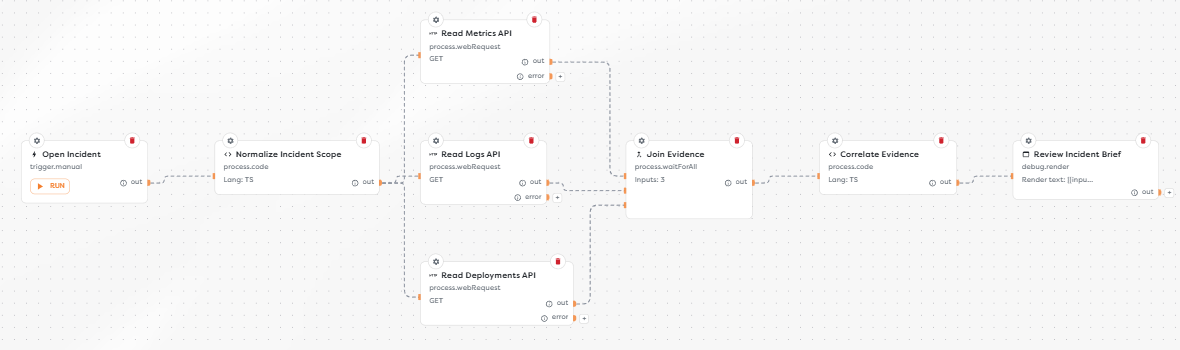
Read-only behavior is a permissions property, not a prompt instruction. Enforce it with provider credentials, HTTP methods, endpoint allowlists, SSH command allowlists, and the absence of write-capable tools.
Understand the trust boundaries
The workflow crosses several independent security and data boundaries:
| Boundary | Builders block | Credential boundary | Read-only control |
|---|---|---|---|
| Incident scope | Manual Trigger | No provider credential | Validate allowlisted services, environments, and a short UTC window |
| Metrics | Web Request | Monitoring API token or protected gateway credential | Permit query endpoints and GET only |
| Logs | Web Request | Logging API token or protected gateway credential | Permit search endpoints and GET only; bound entries and bytes |
| Deployments | Web Request | Source-control or deployment API token | Grant deployment read permission only |
| Optional issue context | Issue Action | GitHub Issues, GitLab Issues, or Jira integration | Select a read operation and use a read-only provider identity |
| Optional host context | SSH Action | SSH remote access integration | Use a dedicated account and explicit read-command allowlist |
| Optional AI summary | AI Agent | Selected model provider | Pass redacted evidence and enable no integration or MCP tools |
Do not place provider tokens in Code, URLs, block labels, screenshots, logs, or the incident brief. Keep them in the supported integration or protected workspace resource used by the request path.
1. Create a dedicated pipeline
Create a pipeline named Read-Only DevOps Incident Analysis. Keep it separate from remediation workflows so a later permission change cannot silently turn analysis into action.
Start with Manual Trigger named Open Incident. Use a non-sensitive test body:
{
"incidentId": "INC-2026-0821-017",
"environment": "production",
"services": ["registration-api", "worker"],
"window": {
"from": "2026-08-21T12:00:00Z",
"to": "2026-08-21T12:20:00Z"
},
"correlationIds": ["req_7f2a"]
}
An operator must choose the scope deliberately. Do not default to every service, every environment, or an unbounded time range.
2. Normalize the incident scope
Add Code named Normalize Incident Scope. Validate the input before it reaches any provider query:
const ALLOWED_ENVIRONMENTS = new Set(["staging", "production"]);
const ALLOWED_SERVICES = new Set([
"registration-api",
"worker",
"notification-api"
]);
const MAX_WINDOW_MS = 60 * 60 * 1000;
export async function run(input: any) {
const incidentId = String(input?.incidentId ?? "").trim();
const environment = String(input?.environment ?? "").trim();
const services = Array.isArray(input?.services)
? [...new Set(input.services.map(String))]
: [];
const correlationIds = Array.isArray(input?.correlationIds)
? [...new Set(input.correlationIds.map(String))]
: [];
const from = new Date(input?.window?.from);
const to = new Date(input?.window?.to);
if (!incidentId || incidentId.length > 120) {
throw new Error("A bounded incidentId is required.");
}
if (!ALLOWED_ENVIRONMENTS.has(environment)) {
throw new Error("Unsupported environment.");
}
if (!services.length || services.length > 5) {
throw new Error("Select between one and five services.");
}
if (services.some((service) => !ALLOWED_SERVICES.has(service))) {
throw new Error("Unsupported service.");
}
if (correlationIds.length > 20 || correlationIds.some((id) => id.length > 160)) {
throw new Error("Correlation ID scope is too large.");
}
if (!Number.isFinite(from.getTime()) || !Number.isFinite(to.getTime())) {
throw new Error("The incident window must contain valid timestamps.");
}
if (from >= to || to.getTime() - from.getTime() > MAX_WINDOW_MS) {
throw new Error("Use a positive incident window no longer than 60 minutes.");
}
return {
incidentId,
environment,
services,
correlationIds,
window: { from: from.toISOString(), to: to.toISOString() }
};
}
The allowlists are illustrative. Match them to the services an operator is authorized to inspect. Validate the raw values before interpolating them into URLs or provider query languages.
3. Prepare read-only data access
Create separate credentials for analysis instead of reusing deployment, administrator, or incident-response automation identities.
| Source | Provider setup | Minimum expected access | Provider reference |
|---|---|---|---|
| Prometheus-compatible metrics | Monitoring gateway or API credential | Query access under /api/v1; no configuration or administrative access | Prometheus HTTP API |
| Grafana Loki logs | Loki or Grafana Cloud query credential | Query endpoints such as query_range; no push, delete, rule, or shutdown endpoints | Loki HTTP API |
| GitHub deployments | Fine-grained token or GitHub App identity | Repository Deployments: read for the intended repositories | GitHub deployment endpoints |
| Kubernetes through an approved gateway or SSH wrapper | Namespace-scoped service account or dedicated host account | get, list, and watch only for required resources | Kubernetes RBAC good practices |
If a provider exposes read and write endpoints behind the same token, put an enforcing gateway in front of it. A convention such as naming a token read-only is not a control.
4. Read three evidence sources in parallel
Add three Web Request blocks after Normalize Incident Scope:
Read Metrics APIRead Logs APIRead Deployments API
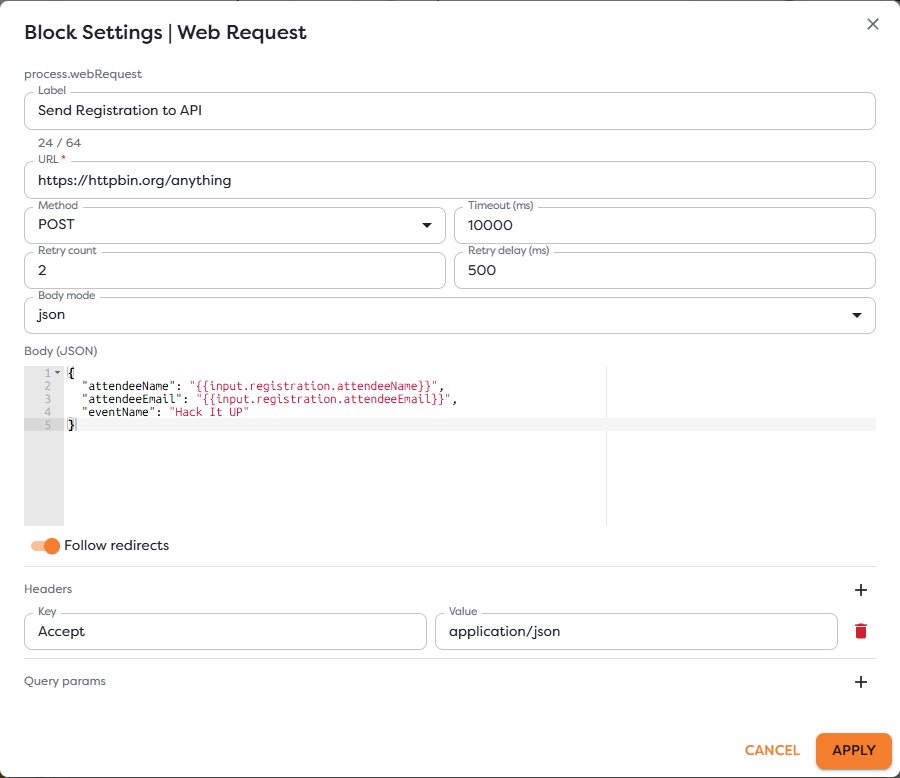
Configure each block with GET, a provider-specific query endpoint, a finite timeout, and an explicit response-size boundary. URL-encode all dynamic query values. Do not call ingest, delete, configuration, deployment creation, or shutdown endpoints.
| Block | Example query purpose | Required bounds |
|---|---|---|
| Read Metrics API | Error rate, request rate, latency, saturation, and availability over the incident window | Services, environment, start, end, step, returned series, and points |
| Read Logs API | Error-level events and selected correlation IDs | Services, environment, start, end, entries, bytes, and line length |
| Read Deployments API | Releases and configuration changes near the incident | Repository or service, environment, start, end, and result count |
Return a normalized envelope from each branch, even when a provider has no matching records:
{
"source": "metrics",
"query": {
"services": ["registration-api", "worker"],
"from": "2026-08-21T12:00:00.000Z",
"to": "2026-08-21T12:20:00.000Z"
},
"observedAt": "2026-08-21T12:22:04.000Z",
"status": "ok",
"items": []
}
Keep status: "empty" distinct from status: "unavailable". An empty successful query is evidence; an authentication failure or timeout is missing evidence.
5. Join the three branches correctly
Add Wait for all named Join Evidence and set Inputs to 3. Connect every evidence source to a different target handle:
| Source block | Join Evidence target handle |
|---|---|
| Read Metrics API | left |
| Read Logs API | right |
| Read Deployments API | meta |
Setting Inputs to 3 does not distribute connections automatically. Verify that the Designer shows three separate orange input ports and that one edge terminates at each port. Three edges attached to the same in port are incorrect and do not represent three independent inputs.
Decide explicitly whether a provider error should fail the run or arrive as a normalized unavailable envelope. Do not convert a missing source into an empty successful source, and do not let Join Evidence make incomplete evidence look healthy.
6. Correlate evidence deterministically
Add Code named Correlate Evidence. Treat provider timestamps as UTC, retain their source, and preserve collection time separately from event time.
The output contract should contain:
{
"incident": {},
"facts": [],
"timeline": [],
"hypotheses": [],
"contradictions": [],
"missingSources": [],
"nextReadOnlyChecks": []
}
Apply these rules:
- A fact must name its source and timestamp.
- A deployment near an error spike is correlation, not proof of causation.
- A hypothesis must list supporting and contradicting evidence.
- Missing, truncated, late, or timezone-ambiguous evidence must remain visible.
- Suggested checks may read more data but must not contain restart, rollback, deploy, edit, delete, acknowledge, or send operations.
- Redact credentials, authorization headers, personal data, session values, and full log payloads before rendering or passing data to AI.
The Code examples use the Builders runtime contract. When adding provider calls in Code, use the direct runtime references:
| Runtime surface | Reference |
|---|---|
BuildersRuntimeContext | BuildersRuntimeContext |
ctx.log | ctx.log |
ctx.fetch | ctx.fetch |
7. Render the incident brief
Add Render named Review Incident Brief. Present the incident scope, collection status for every source, UTC timeline, verified facts, hypotheses with confidence, contradictions, missing evidence, and next read-only checks.
End the brief with an explicit statement:
No automated remediation was performed.
Do not render raw authorization headers, credentials, full log bodies, personal data, or unrestricted provider responses. Link to the original provider record only when its access control is appropriate for the report audience.
8. Add optional sources without breaking read-only behavior
The baseline graph stays useful without these additions. Add one only when it supplies evidence that the three API branches cannot provide.
Read issue context
Use Issue Action with a GitHub Issues, GitLab Issues, or Jira integration and select a read operation. The block is the workflow operation; the integration supplies provider identity and connection settings.
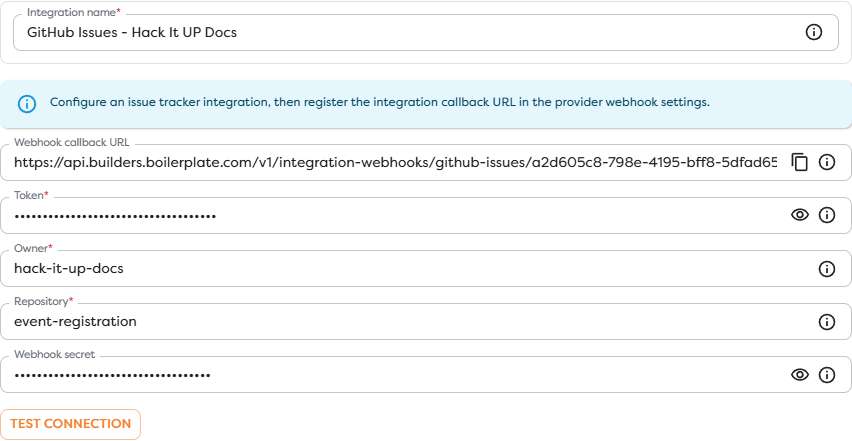
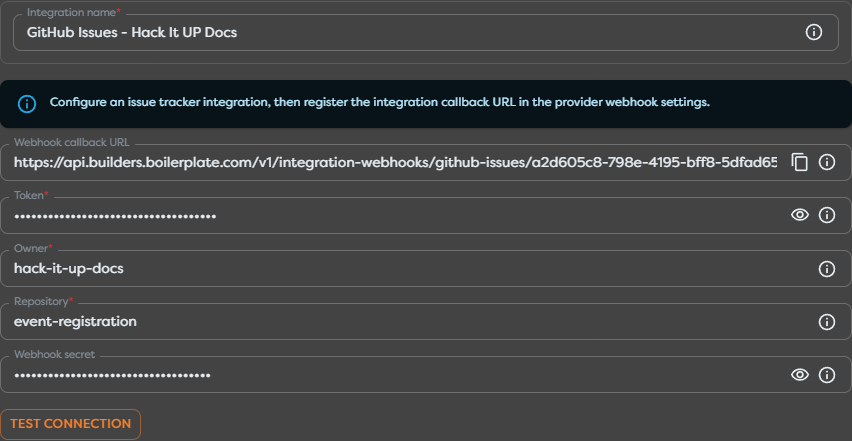
Grant the integration account only access needed to read the intended projects. Do not add comments, labels, assignments, transitions, or issue creation to this analysis pipeline.
Read host or cluster context
Use SSH Action only through an SSH remote access integration with host key verification, a dedicated unprivileged account, and an explicit Allowed commands JSON policy. Prefer fixed server-side wrapper commands such as incident-read-service-status over allowing a general shell command with arbitrary arguments.
For Kubernetes, use namespace-scoped RBAC and allow only required read verbs. Do not grant create, update, patch, delete, deletecollection, bind, escalate, impersonate, or wildcard permissions.
Summarize with AI
Place an optional AI Agent after deterministic normalization and redaction. Give it the evidence envelope, require structured output, and disable all provider integrations and MCP tools. The agent may summarize evidence; it must not gain a side channel capable of changing external state.
{
"summary": "string",
"facts": [
{ "source": "string", "observedAt": "date-time", "statement": "string" }
],
"hypotheses": [
{
"statement": "string",
"confidence": "low | medium | high",
"supportingEvidence": ["string"],
"contradictingEvidence": ["string"]
}
],
"missingEvidence": ["string"],
"nextReadOnlyChecks": ["string"]
}
Validate the response deterministically before rendering it. Never treat model confidence as operational authorization.
9. Publish and test the boundaries
Save and publish the intended version. Run it with one narrow, non-sensitive incident window and compare the brief with the source systems.
| Test | Expected result |
|---|---|
| Valid incident scope | All three queries use the same normalized UTC window and the brief renders |
| Unsupported service or environment | Normalization fails before any provider request |
| Window exceeds the maximum | Normalization fails before any provider request |
| One source returns no records | Brief identifies a successful empty source |
| One source times out or rejects authentication | Run fails or brief identifies that source as unavailable, according to the chosen policy |
| Three incoming Join edges | Each edge terminates at a separate left, right, or meta input |
| Provider token is replaced with a write-capable token | Deployment review fails; the credential is rejected from this workflow |
| Logs contain secrets or personal data | Redaction removes them before correlation, AI, logs, and rendering |
| AI is enabled | Agent has no integration or MCP tools and its output passes schema validation |
| Operator follows a suggested check | The check reads evidence and performs no remediation |
Review provider audit logs during testing. They should contain only the approved read calls from the dedicated analysis identities.
Troubleshoot incident analysis
| Symptom | Check |
|---|---|
| All three edges enter one Join port | Delete the incoming edges and reconnect them separately to left, right, and meta |
| Workflow waits indefinitely at Join Evidence | Input count, distinct target handles, error branches, and whether every branch returns an envelope |
| Metrics and logs do not align | UTC conversion, query boundaries, scrape or ingestion delay, and event time versus collection time |
| A source looks healthy after a timeout | empty versus unavailable status and error normalization |
| Query returns too much data | Time window, service filters, series or entry limit, byte cap, and provider-side aggregation |
| Deployment correlation is misleading | Repository-to-service mapping, environment, commit SHA, deployment time, and rollback records |
| Secret appears in a run or brief | Request headers, provider response fields, Code logs, Render templates, and AI input |
| Supposedly read-only workflow changes state | Provider permissions, endpoint and method allowlists, SSH wrappers, Issue Action operation, and AI tools |
Production checklist
- The pipeline is dedicated to analysis and contains no remediation branch.
- Every provider identity is dedicated, minimal, and scoped to intended resources.
- Web Request blocks use approved query endpoints,
GET, timeouts, and result limits. - Services, environments, correlation IDs, and UTC window are validated before querying.
- Metrics, logs, and deployments connect to three distinct Join Evidence inputs.
- Empty, unavailable, truncated, and late sources remain distinguishable.
- Facts retain source and time; hypotheses retain support, contradiction, and confidence.
- Secrets and personal data are redacted before logs, AI, and Render.
- Optional SSH access uses host verification, an unprivileged account, and fixed read-only wrappers.
- Optional issue access uses a read operation and read-only provider identity.
- Optional AI has no integration or MCP tools and cannot change external state.
- Test evidence and provider audit logs show only approved reads.
- The final brief states that no automated remediation was performed.