
Builders Runtime Context
BuildersRuntimeContext is the ctx object supplied to every Code block execution. Do not import, construct, return, serialize, or store it for another run.
Interface
interface BuildersRuntimeContext {
log: BuildersLogger;
fs(
kind?: FileStorage,
integrationName?: string
): BuildersFileSystem;
vault: {
get<T = unknown>(
name: string,
type?: "general" | "ai" | "database" | "integration"
): Promise<T>;
};
db: {
getConnection(
name: string
): Promise<BuildersDatabaseConnection>;
};
fetch(
input: string,
init?: BuildersFetchInit
): Promise<BuildersFetchResponse>;
now(): number;
}
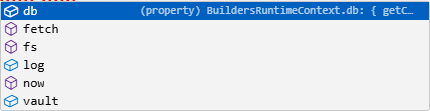
Type ctx. in the TypeScript editor to inspect the current members and their declarations.
log
interface BuildersLogger {
(...args: unknown[]): void;
info(...args: unknown[]): void;
warn(...args: unknown[]): void;
error(...args: unknown[]): void;
}
Use info for expected progress, warn for a deliberately handled degraded state, and error for a failed operation. The callable form ctx.log(...) writes a standard message.
ctx.log.info("Batch completed", {
correlationId: input.correlationId,
itemCount: items.length,
truncated: items.length === limit
});
Logs are retained with the block execution. Do not log Vault values, credentials, authorization headers, raw files, complete provider bodies, or unnecessary personal data. ctx.log.error(...) records a message; use throw when the block must fail.
fetch
interface BuildersFetchInit {
method?: string;
headers?: Record<string, string>;
body?: string;
timeoutMs?: number;
redirect?: "follow" | "manual" | "error";
}
interface BuildersFetchResponse {
readonly status: number;
readonly statusText: string;
readonly ok: boolean;
readonly url: string;
readonly headers: Record<string, string>;
text(): Promise<string>;
json<T extends JsonValue = JsonValue>(): Promise<T>;
base64(): Promise<string>;
buffer(): Promise<Buffer>;
byteArray(): Promise<ByteArray>;
}
const response = await ctx.fetch("https://status.example.com/api/health", {
method: "GET",
timeoutMs: 5000,
redirect: "error"
});
if (!response.ok) {
throw new Error(`Health request failed with ${response.status}.`);
}
return response.json();
Set a finite timeout, check ok or status, and decode the response once in the required format. Do not log authorization headers or unrestricted response bodies.
fs
type FileStorage =
| "context"
| "static"
| "google_drive"
| "onedrive"
| "aws_s3"
| "custom_s3";
ctx.fs(kind?, integrationName?) returns a BuildersFileSystem. The integration name is required when the selected external storage connection must be identified explicitly.
| Method group | Methods |
|---|---|
| Read | read, readText, readBinary, readBuffer, readByteArray, stat |
| Write | write, writeText, writeBinary, writeBuffer, writeByteArray |
| Manage | list, mkdir, remove, rm, mv |
Read and metadata methods accept a path or canonical Builders File where declared. Write methods return a File descriptor. Use the storage type and exact integration name that belong to the current project scope.
const files = ctx.fs("context");
const report = await files.writeText(
`reports/${input.reportId}.json`,
JSON.stringify(input.report)
);
return { report };
db
interface BuildersDatabaseConnection {
query<T = unknown>(
sql: string,
params?: unknown[]
): Promise<T[]>;
command<T = Record<string, unknown>>(
command: Record<string, unknown> | string
): Promise<T>;
}
Resolve the exact saved connection name, then use query for supported SQL access or command for the connection's command contract.
const database = await ctx.db.getConnection("Event Operations");
const rows = await database.query(
"select id, status from registrations where event_id = $1 limit 100",
[input.eventId]
);
Use parameterized SQL and bound result sizes. Connection availability, engine, and permissions come from the saved database resource.
vault
const config = await ctx.vault.get<{
baseUrl: string;
audience: string;
}>("Incident API Config", "general");
The optional type narrows resolution to general, ai, database, or integration. The generic parameter is only a compile-time expectation; validate the returned shape before use. Never log or return protected credentials.
now
ctx.now() returns the runtime clock in milliseconds:
const startedAt = ctx.now();
const result = await performRead();
ctx.log.info("Read completed", {
durationMs: ctx.now() - startedAt
});
Use it for observation timestamps and durations, not as a guaranteed unique identifier or idempotency key. Preserve an event timestamp from input when replay must retain the original time.
Errors and scope
All asynchronous members can reject. Await operations and throw when the Code block cannot satisfy its output contract. Runtime clients follow the current workflow's project, owner, team access, integration availability, and published version; resolving a name is not an authorization bypass.
For the sandbox, supported output values, canonical File, and binary data contracts, see Builders Runtime API.