
Database Connections
Database connections store reusable access settings for PostgreSQL, MySQL, and MongoDB. A DB Query block selects an available connection instead of embedding a host, username, or password in the workflow.
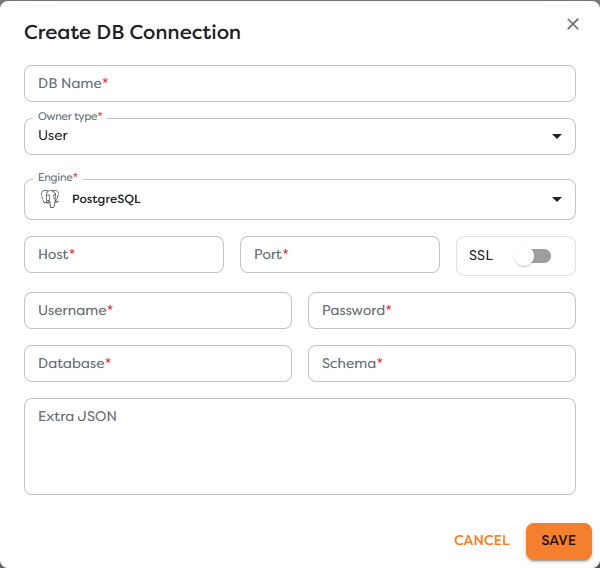
Create a connection
Open Databases, select Create, and configure the connection for the target engine.
| Field | Purpose |
|---|---|
| DB Name | Human-readable selector shown to workflow authors |
| Owner type | Personal or team scope controlling project visibility |
| Engine | PostgreSQL, MySQL, or MongoDB |
| Host / Port | Network address reachable from the Builders execution environment |
| SSL | Enables encrypted transport when required by the server |
| Username / Password | Credentials for a dedicated database account |
| Database / Schema | Default database and, where applicable, schema context |
| Extra JSON | Additional engine or deployment options that cannot be expressed by the standard fields |
Do not use localhost unless the database actually runs in the same network environment as the Builders executor. A database available from a developer laptop may still be unreachable from a published workflow.
Configure each engine
PostgreSQL
Provide the server host, port, database, credentials, SSL choice, and schema required by the deployment. PostgreSQL authentication rules can vary by host, database, user, address, and authentication method; review the server's pg_hba.conf authentication documentation.
Create a role with only the required database and schema privileges. A reporting workflow should not use an administrative or migration account.
MySQL
Provide the server host, port, database, credentials, and TLS settings expected by the server. Use the official MySQL Connector documentation to check connection and TLS behavior for the deployed MySQL version.
MySQL accounts can be restricted by both user and connecting host. Confirm that the account accepts connections from the Builders runtime network.
MongoDB
Provide the deployment host details, credentials, target database, TLS settings, and any required options. Confirm the topology and parameters against the official MongoDB connection string formats, including standard and DNS seed-list deployments.
Grant access only to the required databases, collections, and commands. Prefer a bounded read role when the workflow does not modify data.
Use SSL and Extra JSON deliberately
Enable SSL whenever the database requires TLS or crosses an untrusted network. Do not disable certificate verification merely to make an initial test pass; correct the trust chain and server name instead.
Use Extra JSON only for supported connection options that are not represented by the form. Keep the object minimal, valid JSON, and reviewed. Do not duplicate the password or build an undocumented connection string inside it.
Validate the connection
The create form does not expose a separate connection-test action. Validate operational access through a controlled DB Query after saving:
- Select the connection in a test pipeline with the same ownership scope as production.
- Run a minimal bounded read such as
SELECT 1or a non-sensitive collection command. - Inspect the DB Query status, duration, and structured result.
- Test one representative query using parameters.
- Confirm that a forbidden operation is rejected by the least-privilege account.
A successful network connection does not prove that production queries are correct, indexed, authorized, or idempotent.
Use the connection from DB Query
DB Query filters connections available to the current project. Relational runtime values must use engine parameters such as PostgreSQL $1 or MySQL ?; do not concatenate untrusted input into SQL. MongoDB commands should use bounded filters and the minimum required command privileges.
See DB Query for query syntax, parameters, results, testing, and error handling.
Troubleshoot connections
- The connection is absent from DB Query: verify its owner, team membership, and project scope.
- The host times out: check DNS, firewall rules, allowlists, routing, and whether the server is reachable from Builders.
- Authentication fails: verify the username, password, database, authentication source, and allowed client hosts.
- TLS fails: verify the server certificate, hostname, CA chain, protocol requirements, and SSL selection.
- Permission is denied: grant the dedicated account the exact table, schema, collection, or command privilege required.
- An option is rejected: remove undocumented Extra JSON values and validate each supported option individually.