
Endpoint Trigger
Use an Endpoint Trigger to expose a published workflow through a Builders-hosted HTTP URL. An application, webhook sender, command-line client, or another service can call that URL and supply the workflow input.
This article uses a separate Documentation - Endpoint Trigger pipeline in the Hack It UP - event project. Its protected POST endpoint validates an event-registration object, passes the accepted values to a Render Block, and returns that block's output as a synchronous JSON response.
Configure the method and path
Drag Endpoint Trigger from Triggers onto the Designer canvas, then open its settings. Choose the HTTP method and, optionally, replace the generated block ID with a readable custom path.


Builders supports these methods:
| Method | Typical use |
|---|---|
GET | Retrieve a resource without a request body or file upload. |
POST | Submit an event, command, form payload, or new resource. |
PUT | Replace a resource at a known location. |
PATCH | Apply a partial update. |
DELETE | Request removal of a resource. |
Choose the method according to the caller's HTTP contract. In particular, do not use GET for a workflow that changes data merely because it is easy to invoke from a browser.
The generated address has this shape:
https://api.builders.boilerplate.com/triggers/<project-id>/<pipeline-id>/<endpoint-path>
A custom path may contain multiple segments, such as events/hack-it-up/registrations. Do not add a leading or trailing slash. Use letters, numbers, ., _, ~, and - within its segments. Keep the path stable once clients depend on it; changing it and publishing the version changes the live address callers must use.
Protect access
Endpoint Trigger is token-protected by default. A caller can provide the configured token in either of these forms:
Authorization: Bearer <endpoint-token>
x-trigger-token: <endpoint-token>
Treat the token as a credential. Store it in the calling system's secret manager, never place its real value in source code or documentation, and replace it if it appears in logs or screenshots.
Disable Require authentication only when the endpoint is intentionally public. Public access means anyone who obtains the URL can create runs and consume the workflow owner's compute tokens. Configure the maximum request count and time window to limit traffic. This limit applies to the endpoint as a whole, not separately to every caller or IP address, so it is not a substitute for caller authentication.
Define the JSON request
For a JSON endpoint, leave Initial body (JSON) as {} when the caller should supply the complete business payload. The accepted object becomes the trigger output, so the next block can read values such as {{input.attendeeName}}, {{input.attendeeEmail}}, and {{input.ticketType}}.
The registration example accepts:
{
"attendeeName": "Alex Morgan",
"attendeeEmail": "alex.morgan@example.com",
"ticketType": "standard",
"consent": true
}
Send JSON with Content-Type: application/json. Before building downstream templates, make one controlled request and inspect the trigger and first-block output to confirm the runtime shape.
Validate with JSON Schema
Enable Validate request body, then enter a JSON Schema that describes the accepted object. Validation rejects malformed input before it reaches downstream blocks.
Builders validates the schema with Ajv. Use the Ajv JSON Schema reference to check supported schema versions, validation keywords, and their behavior before relying on a rule in a published endpoint.
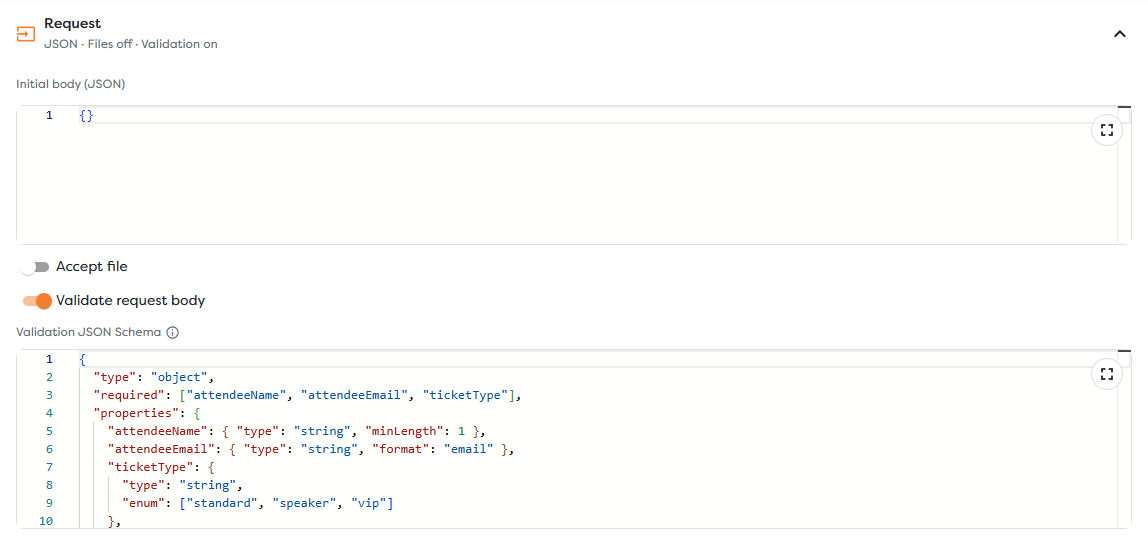
The example uses:
{
"type": "object",
"required": ["attendeeName", "attendeeEmail", "ticketType"],
"properties": {
"attendeeName": { "type": "string", "minLength": 1 },
"attendeeEmail": { "type": "string", "format": "email" },
"ticketType": {
"type": "string",
"enum": ["standard", "speaker", "vip"]
},
"consent": { "type": "boolean" }
},
"additionalProperties": false
}
This contract requires a non-empty name, an email, and one of the three ticket types. additionalProperties: false also rejects unexpected fields. Use that strict setting when the caller and contract are under your control; allow additional properties when forward compatibility is more important.
A live request without attendeeEmail returns HTTP 400 with a validation error and does not continue through the connected workflow path. Validate again inside downstream code when a value has security-sensitive meaning, such as a database identifier, file path, or authorization scope.
Accept file uploads
Enable Accept file when callers need to send multipart/form-data. Configure:
| Setting | Purpose |
|---|---|
| File mode | Accept one file or multiple files in the request. |
| Field name | Match the multipart field used by the caller. |
| Maximum size and unit | Reject files that exceed the endpoint's intended limit. |
| Storage type | Keep the file in run context or save it to persistent Static Drive storage. |
| Destination path | Choose the stored path, optionally using file metadata in a template. |
For example, uploads/{{file.filename}} derives the destination from the uploaded name. Do not trust a client-supplied filename as an authorization boundary. Apply size limits, restrict supported content types in downstream logic, and generate controlled destination names when files must not overwrite one another.
Context storage is appropriate for files needed only during the run. Choose static storage when another run or user must access the file later, and confirm that the pipeline owner has access to that storage scope. GET endpoints do not accept file uploads.
Choose a response mode
Use Async when the caller only needs confirmation that Builders accepted the request. The workflow continues in the background, so the initial HTTP response does not represent downstream completion.
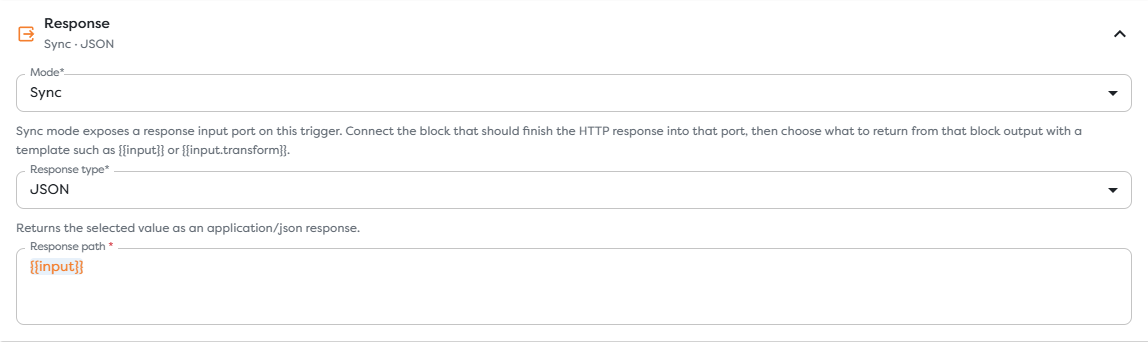
Use Sync when the caller needs a value produced by the workflow. Sync mode adds a Response input port to the trigger. Connect the output of the block that completes the HTTP result back to that port.
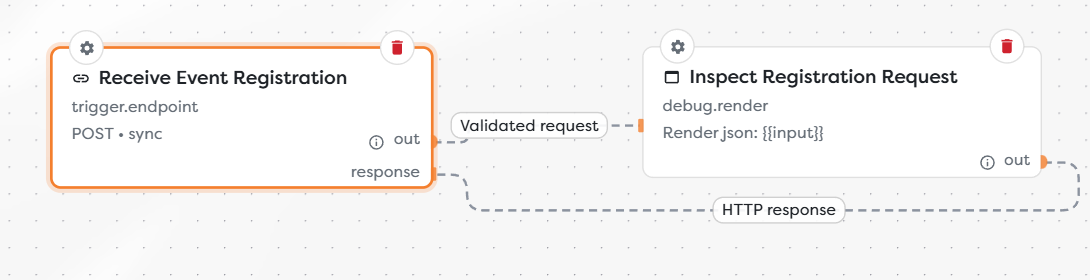
The normal Out connection starts execution. The returning connection identifies the block whose result will finish the HTTP response. Keep this path short enough for an HTTP caller to wait for it, and use Async mode for long-running jobs.
In the Response settings, select the format and point Response path at the value to return. {{input}} returns the complete output received through the Response port; a narrower expression such as {{input.result}} returns only that field.
Available response formats include:
| Response type | Result |
|---|---|
| JSON | Serializes the selected value as application/json. |
| Text | Returns plain text. |
| XML | Returns XML content. |
| HTML | Returns HTML content. |
| File | Returns a file descriptor as an image, PDF, or another binary response. |
For a file response, configure the filename, MIME type, and disposition. Use Inline when a browser may display the content, or Attachment when it should prompt a download. Ensure the selected response path resolves to the file descriptor produced by the connected block.
Cache file responses
Response caching is available for a synchronous GET endpoint that returns a file. Configure a positive TTL and its unit; the maximum supported duration is 365 days.
Cache only content that is stable and safe to reuse. Do not cache a personalized document or a file whose authorization depends on request-specific input. When the source file changes, account for the remaining TTL before expecting every caller to receive the new version.
Publish and call the endpoint
Apply the trigger settings, save the version, and publish it. Live endpoint traffic targets the published version; changes left in a draft do not alter the active contract.
Call the protected registration endpoint with placeholders for deployment-specific values:
curl --request POST \
'https://api.builders.boilerplate.com/triggers/<project-id>/<pipeline-id>/events/hack-it-up/registrations' \
--header "Authorization: Bearer $ENDPOINT_TOKEN" \
--header 'Content-Type: application/json' \
--data '{
"attendeeName": "Alex Morgan",
"attendeeEmail": "alex.morgan@example.com",
"ticketType": "standard",
"consent": true
}'
The published example returns HTTP 200 with JSON for the valid request. To verify validation, send a second request without attendeeEmail and confirm that it returns 400. Then open the published run and inspect the trigger, downstream block, duration, and response-related output.
Do not treat an accepted asynchronous request as proof that the workflow completed. Use the returned run reference and Builders run history to investigate downstream execution.
Troubleshoot endpoint calls
- The URL returns not found: confirm the project ID, pipeline ID, custom path, HTTP method, and that the intended version is published.
- The request is unauthorized: provide the current token through
Authorization: Bearerorx-trigger-token; do not send both with different values. - The request returns
400: verify valid JSON,Content-Type, required schema properties, property types, andadditionalPropertiesrules. - A file is missing: use
multipart/form-data, match the configured field name, and stay within the size limit. - The synchronous response is empty: connect the final block to the trigger's Response port and check that Response path exists in that block's output.
- The caller times out: shorten the synchronous path or change the endpoint to Async and monitor the run separately.
- A public endpoint is overused: protect it with a token, reduce its endpoint-wide rate limit, and filter requests before expensive blocks.
- A cached file is stale: review the GET file-response TTL and publish or invoke the endpoint according to the cache lifecycle.