
Issue Trigger
Use an Issue Trigger to start a published workflow when an issue is created, updated, or commented on in Jira, GitHub Issues, or GitLab Issues. Builders receives the provider webhook through the selected integration, normalizes the event, applies the trigger filters, and sends accepted input through the block's Out port.
This article uses the separate Documentation - Issue Trigger pipeline in the Hack It UP - event project. The example watches registration-related activity in a GitHub repository and sends each accepted event to a Render Block for inspection.
Choose an issue provider
Create an issue integration before adding the trigger. Builders supports Jira Cloud, GitHub repository issues, and GitLab project issues.
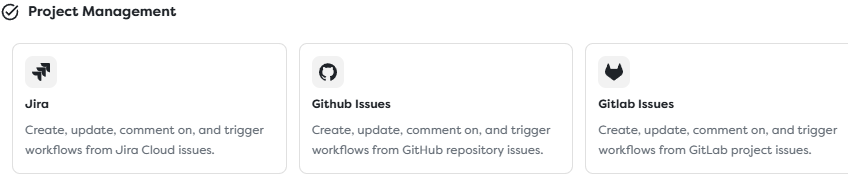
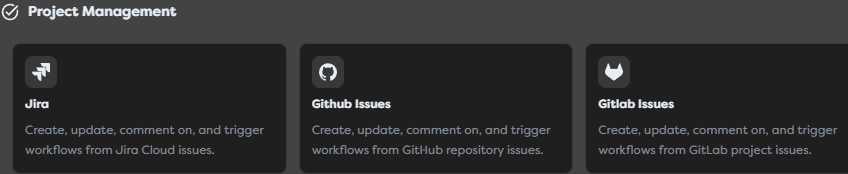
The providers expose the same Builders trigger, but their scopes and identifiers differ:
| Provider | Integration scope | Issue identity | Provider webhook events |
|---|---|---|---|
| Jira Cloud | One Atlassian site, with optional default project and issue type. | Human-readable key such as EVENT-42 plus a numeric issue ID. | Issue created or updated and comment created, with optional JQL filtering. |
| GitHub Issues | One repository identified by owner and repository name. | Issue number, scoped to the repository. | issues activity and issue_comment activity. |
| GitLab Issues | One GitLab.com or self-managed project. | Issue iid, scoped to the project, plus a global id. | Issue Hook and Note Hook events for issue comments. |
Use a separate integration for each repository, GitLab project, or Jira credential boundary that requires independent access, rotation, ownership, or webhook configuration.
Prepare a Jira integration
Create Integrations > Jira and configure:
| Field | Purpose | Required |
|---|---|---|
| Base URL | Jira Cloud site URL, for example https://company.atlassian.net. | Yes |
| Atlassian account email associated with the API token. | Yes | |
| API token | Atlassian API token used for supported Jira operations. | Yes |
| Default project key | Optional project used by Issue Action when a block does not override it. | No |
| Default issue type ID | Optional issue type used by create operations when a block does not override it. | No |
| Webhook secret | Secret used to authenticate supported Jira webhook deliveries. | No, but recommended |
Create a dedicated API token and grant the account only the Jira product and project access required by the workflow. The project key and issue type ID are provider identifiers, not display names.
Save the integration, reopen it, and copy its read-only Webhook callback URL. Register that URL as a Jira webhook and select the required events, normally jira:issue_created, jira:issue_updated, and comment_created. Apply a provider-side JQL filter such as project = EVENT to reduce irrelevant deliveries before they reach Builders. Jira documents the supported issue and comment events and their JQL filtering in Jira Cloud webhooks.
Use the same secret in Jira when the webhook registration method exposes a secret. Keep the secret and API token out of issue text, workflow output, and logs. Review Atlassian API tokens before using a personal account in production.
Prepare a GitHub Issues integration
Create Integrations > GitHub Issues and configure:
| Field | Purpose | Required |
|---|---|---|
| Token | GitHub token used for supported issue reads and actions. | Yes |
| Owner | Repository owner or organization login. | Yes |
| Repository | Repository name without the owner prefix. | Yes |
| Webhook secret | Shared secret used to verify GitHub webhook signatures. | No, but recommended |
Prefer a fine-grained token restricted to the selected repository. Grant read access for a trigger-only workflow and add Issues write access only when Issue Action must create, update, close, reopen, or comment. Follow GitHub's fine-grained personal access token guidance.
After saving the integration, copy its Webhook callback URL and create a repository webhook in GitHub:
- Set Payload URL to the Builders callback.
- Select
application/jsonas the content type. - Enter the same value as the integration's Webhook secret.
- Subscribe to Issues and Issue comments rather than every repository event.
- Keep SSL verification enabled and send a controlled delivery.
GitHub sends issue changes through the issues event and comments through issue_comment. It signs a delivery with the configured secret in X-Hub-Signature-256 and identifies it with X-GitHub-Delivery. See GitHub webhook events and payloads and validating webhook deliveries.
An issue_comment event can describe a comment on an issue or a pull request. If the workflow is issue-only, inspect the normalized input and reject payloads that include pull-request context before performing external effects.
Prepare a GitLab Issues integration
Create Integrations > GitLab Issues and configure:
| Field | Purpose | Required |
|---|---|---|
| Custom server | Enables a self-managed GitLab base URL instead of GitLab.com. | No |
| Base URL | Root URL of the self-managed GitLab instance. Visible in custom-server mode. | For a custom server |
| Token | Project or personal access token used for supported issue operations. | Yes |
| Project ID | Numeric project ID or a supported URL-encoded namespace and project path. | Yes |
| Webhook secret | Secret token expected from the project webhook. | No, but recommended |
Limit the token to the selected project and the API access required by the workflow. For a self-managed server, use a stable HTTPS base URL and a certificate chain trusted by the Builders runtime.
Save the integration, copy its Webhook callback URL, and create a project webhook under GitLab Settings > Webhooks. Enter the same value in GitLab's Secret token field, then enable Issues events and Comments. GitLab sends the secret token in X-Gitlab-Token, identifies the event type in X-Gitlab-Event, and exposes a stable retry identity through Idempotency-Key or webhook-id on current versions. Review GitLab project webhooks and webhook events.
The Builders integration currently provides a webhook secret field for the provider's secret-token flow. Do not replace it with another signing mode unless the integration explicitly supports that mode.
Configure Issue Trigger
Drag Issue Trigger from Triggers onto the Designer canvas and open its settings.
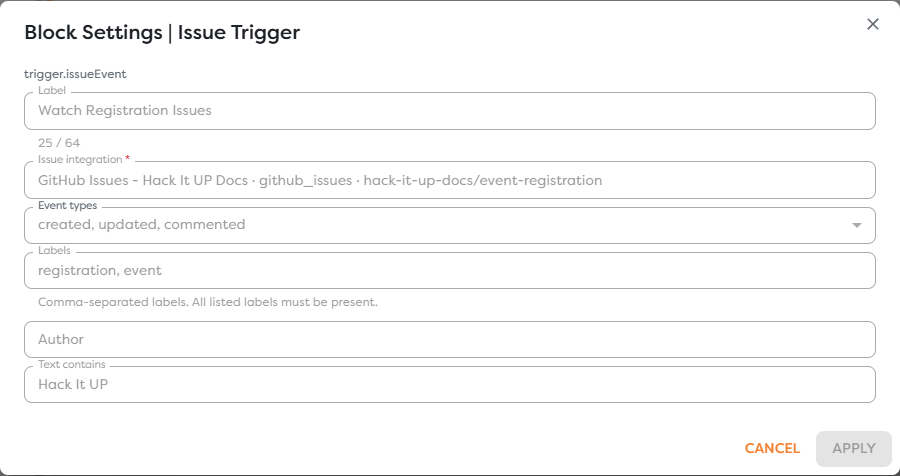
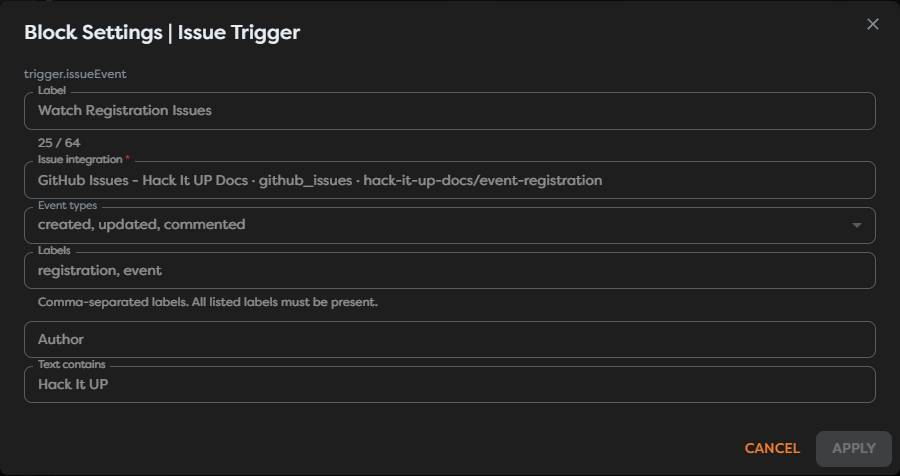
Configure these fields:
| Field | Behavior |
|---|---|
| Issue integration | Selects the accessible Jira, GitHub Issues, or GitLab Issues integration that receives the provider webhook. |
| Event types | Accepts one or more normalized event classes: created, updated, and commented. |
| Labels | Optional comma-separated list. Every listed label must be present on the normalized issue. |
| Author | Optional normalized author filter. Use the provider identity observed in a real trigger output. |
| Text contains | Optional substring filter applied to the normalized event text. Confirm which title, body, or comment value is exposed for each event type. |
The example selects all three event types, requires both registration and event, and requires the event text to contain Hack It UP. It leaves Author empty so activity from any user can pass the remaining filters.
Use provider-side event selection and project or repository scope as the first filter. Builders filters run after the provider has delivered the webhook, so they reduce workflow runs but do not reduce webhook traffic sent to the callback.
Understand normalized event types
Builders reduces provider-specific actions to the selected trigger classes:
| Builders event type | Jira examples | GitHub examples | GitLab examples |
|---|---|---|---|
created | jira:issue_created | issues with action opened | Issue Hook for a new issue |
updated | jira:issue_updated | issues actions such as edited, assigned, labeled, closed, or reopened | Issue Hook updates, closing, or reopening |
commented | comment_created | issue_comment activity | Note Hook whose target is an issue |
The normalized class is suitable for routing, but preserve the original provider action when the next block must distinguish edits, labels, assignment, closing, or reopening. Do not infer a state transition from updated alone.
Connect and inspect the event
Connect the trigger's Out port to the first validation or normalization block. During development, a Render Block with {{input}} reveals the actual structure delivered by the selected provider.


Inspect at least these data groups before writing downstream expressions:
| Data group | Values to locate |
|---|---|
| Event | Normalized event type, original provider event or action, delivery identity, and timestamp. |
| Provider scope | Jira site and project, GitHub owner and repository, or GitLab host and project. |
| Issue identity | Jira key and ID, GitHub issue number, or GitLab issue IID and ID. |
| Issue content | Title, description or body, state, labels, milestone, and web URL. |
| People | Event author or sender, issue reporter, creator, assignees, and account or username identifiers. |
| Comment | Comment ID, body, author, creation time, and parent issue context when the event is commented. |
| Change context | Previous and current values or provider change metadata when exposed. |
Do not copy paths from one provider into another workflow. For example, Jira issue keys, GitHub issue numbers, and GitLab IIDs are not interchangeable. Use Designer autocomplete after one real event and preserve both the provider scope and local issue identifier when building links or deduplication keys.
Treat issue titles, descriptions, comments, labels, usernames, and URLs as untrusted input. Validate values before placing them in SQL, HTML, shell commands, file paths, prompts, or privileged API requests.
Publish and test a real webhook
External issue activity starts live runs only for a published pipeline version.
- Test the integration credentials and confirm the provider scope.
- Save the Issue Trigger and a connected Render or validation block.
- Publish the intended pipeline version.
- Confirm that the provider webhook targets the callback URL from the same integration selected by the trigger.
- Create one uniquely named test issue that satisfies the trigger filters.
- Update it and add one comment to exercise each selected event type.
- Open the resulting published runs and inspect the trigger input and downstream output.
- Review the provider's webhook delivery log for response status, headers, retries, and rejected events.
When testing the example, the issue must contain both registration and event labels and the relevant normalized text must contain Hack It UP. A delivery that reaches Builders but fails a trigger filter correctly produces no accepted workflow path.
Prevent duplicates and automation loops
Webhook providers can retry deliveries, and a workflow can trigger itself when Issue Action updates or comments on the same issue.
Build an idempotency key from provider and scope plus the most stable delivery identifier available:
| Provider | Useful retry identity |
|---|---|
| GitHub | X-GitHub-Delivery when exposed, with repository identity. |
| GitLab | webhook-id or Idempotency-Key when exposed, with project identity. |
| Jira | Webhook delivery identity when exposed; otherwise combine provider event, issue identity, action, and event timestamp conservatively. |
Store the key atomically before sending email, charging, creating records, or calling Issue Action. A repeated delivery should return the previously recorded outcome or stop before the external effect.
To prevent a feedback loop:
- exclude the automation account with Author when one stable provider identity owns all automated changes;
- add a dedicated marker label or comment token and reject matching events before Issue Action;
- record outbound issue and comment IDs and ignore their corresponding inbound events;
- separate inbound triage from outbound updates when their permissions or ownership differ;
- cap deliberate follow-up behavior with an explicit state transition instead of relying on repeated comments.
Do not rely only on issue text to identify a retry. Two legitimate issues can have identical titles and bodies.
Secure issue automation
- Store provider API tokens and webhook secrets only in the integration's sensitive fields.
- Restrict tokens to the intended Jira projects, GitHub repositories, or GitLab projects and the required read or write operations.
- Use a different webhook secret per environment and rotate it after suspected disclosure.
- Keep provider TLS verification enabled and use trusted HTTPS certificates for self-managed GitLab.
- Subscribe only to required events and use Jira JQL or provider scope to reduce unnecessary delivery.
- Avoid placing raw issue or comment bodies in logs when they can contain personal, confidential, or security data.
- Validate provider identity and issue scope again before privileged Issue Action operations.
The example integration and repository shown in the screenshots use placeholder credentials and do not connect to a real GitHub repository.
Troubleshoot issue runs
- Issue Trigger is unavailable: create an accessible Jira, GitHub Issues, or GitLab Issues integration in the project's personal or team ownership scope.
- The integration test fails: verify the base URL, token, account email, owner, repository, project ID, token scope, and provider account access.
- No live run appears: confirm that the version is published, the webhook uses the callback from the selected integration, and the provider delivery received a successful response.
- The webhook is rejected: compare the provider secret with the integration's webhook secret and inspect GitHub signature, GitLab token, or Jira webhook verification details.
- The provider reports a redirect or TLS error: use the callback exactly as shown, keep HTTPS intact, and fix proxy, DNS, or certificate configuration instead of disabling verification.
- Created issues work but comments do not: subscribe to Jira comment events, GitHub Issue comments, or GitLab Comments in addition to issue events.
- GitHub pull-request comments create runs: detect pull-request context in the event and stop the issue-only path.
- A labeled issue does not pass: every comma-separated label in Labels must be present; compare spelling and case with the normalized output.
- The text filter rejects an expected event: inspect whether that event exposes title, issue body, or comment text in the normalized field and test the exact substring.
- The same event runs more than once: deduplicate by the provider delivery identity before external effects and inspect provider retries.
- The workflow comments forever: exclude the automation actor or marker and guard Issue Action with an explicit loop-prevention condition.
- An issue identifier addresses the wrong item: combine the number, key, or IID with its repository, Jira project/site, or GitLab project scope.
- A downstream path is missing: render
{{input}}from the actual provider and use autocomplete rather than assuming another provider's schema.
Next steps
- Issue and Project Management Integrations
- Trigger Blocks
- Use Template Expressions
- Read Block Logs and Output
- Run Published Workflows
The next article will cover Web Form Trigger.