AI Agent Overview
AI Agent (ai.generate) runs a language model as one step in a workflow. It receives the data passed through its In port, renders a prompt from that data, calls the selected AI source, and sends either a model result through Out or failure details through Error.
AI Agent is not the AI Designer Assistant. The Designer Assistant helps a person edit the canvas. AI Agent executes inside every workflow run that reaches the block.
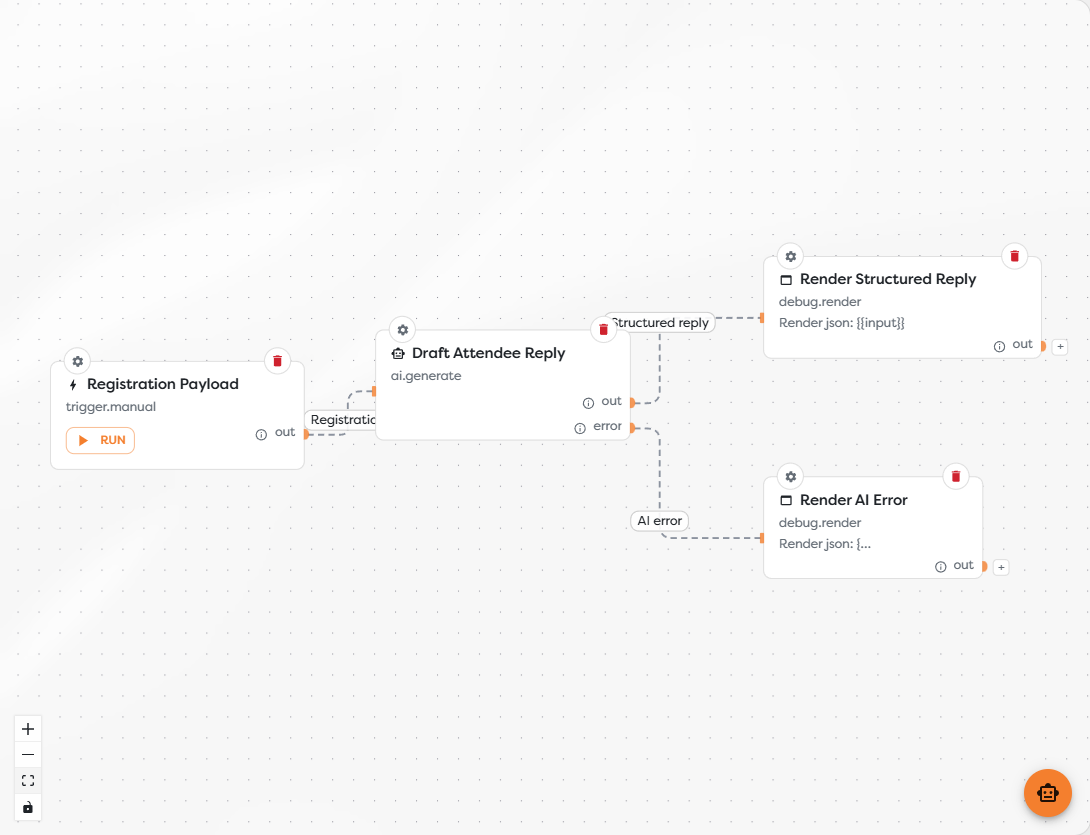
Understand the data flow
The example workflow uses this sequence:
Registration Payload
-> Draft Attendee Reply
Out -> Render Structured Reply
Error -> Render AI Error
The incoming registration object is available to the AI Agent as input. The block renders configured template expressions, sends the resulting request to its selected model source, and waits for the provider response.
| Port | Emitted when | Connect it to |
|---|---|---|
| In | An upstream block starts the AI step | The trigger or processing block that supplies the model input |
| Out | The model call completes and the configured output requirements are satisfied | A block that stores, sends, transforms, or inspects the result |
| Error | The source, provider, tool call, timeout, or structured response fails | Logging, notification, fallback, or retry logic |
Do not leave Error unconnected in a production workflow. A workflow can finish while following the error branch, so the error-handling block must decide whether to report, recover, or deliberately stop further processing.
Configure the block in a deliberate order
- Give the block a label that states its outcome, such as
Draft Attendee Reply. - Choose the model source according to capability, latency, ownership, and usage.
- Write the prompt and tune generation using only the data needed for the task.
- Choose free-form text or structured output.
- Configure attachments, tools and integrations, or memory only when the task requires them.
- Set a provider timeout in Advanced and connect the
Errorport. - Run the workflow with representative input before publishing.
Know what the model can access
AI Agent does not automatically receive the whole project or every integration. Its request is assembled from explicitly configured capabilities:
| Capability | What it makes available |
|---|---|
| Prompt templates | Rendered values from input, Vault, and stable run metadata |
| Attachment sources | Selected canonical File values supported by the chosen model |
| Memory | Retained messages for the resolved conversation identifier |
| Tools | Only the operations explicitly enabled for this block |
| Integrations | Credentials and permissions required by selected integration-backed tools |
Selecting a model source does not grant access to email, Slack, Drive, a database, or another external service. Those actions require an enabled tool and, where applicable, a compatible integration.
Design a dependable AI step
- Give the model one clear task and define what a successful result means.
- Pass the smallest useful input instead of serializing the entire run context.
- Prefer structured output when a later block depends on named fields.
- Keep credentials out of prompts, schemas, labels, and logs.
- Treat model output as untrusted input before using it in messages, queries, or side-effecting tools.
- Use a separate error branch for provider failures, timeouts, and invalid structured responses.
- Inspect logs, output, usage, and external side effects with production-like input.
Every AI Agent execution consumes workflow compute tokens. Depending on the selected source, it can also consume Builders AI tokens or usage from a privately configured provider account.