
Build a Queue-Driven Processing Workflow
Use a Queue Trigger, deterministic Code blocks, a durable idempotency service, and Queue Action to process jobs without acknowledging them before their effects are complete. This guide uses Amazon SQS as the concrete provider, but the ownership, validation, idempotency, and completion boundaries also apply to RabbitMQ and ActiveMQ after adapting their delivery fields and acknowledgement model.
Build the workflow in this order:
- Receive Queue Job receives a bounded batch from the queue.
- Normalize Job parses and validates one provider delivery.
- Acquire Lease atomically claims the business job or recognizes a completed duplicate.
- Execute Job performs the bounded business effect with the same idempotency key.
- Finalize State durably records the result.
- Acknowledge Message deletes or acknowledges the current provider delivery only after success.
Do not treat a successful receive as completion. Amazon SQS standard queues use at-least-once delivery, so the same message can arrive again even when the first attempt appeared successful. AWS explicitly recommends idempotent consumers in its at-least-once delivery documentation.
Understand the reliability boundary
The queue, Builders run, durable state, and downstream service are separate systems. A Designer edge transports data between blocks; it does not create a distributed transaction across them.
| Event | Durable fact after the event | May the message be acknowledged? |
|---|---|---|
| Queue Trigger receives a delivery | The provider has temporarily delivered a message | No |
| Input passes validation | The workflow understands the requested job | No |
| Lease is acquired | One worker currently owns the job key | No |
| Downstream request returns success | The external system may have applied the effect | Not yet |
| Completion record is committed | The idempotency store can recognize future duplicates | Yes |
| Queue Action succeeds | The current provider delivery is complete | Already completed |
A visibility timeout is not a business lock, a uniqueness constraint, or proof that only one run exists. SQS keeps a received message in the queue and makes it temporarily invisible; it becomes visible again if it is not deleted before the timeout expires. See Amazon SQS visibility timeout.
1. Prepare the queue and integration
Create a dedicated source queue and a dead-letter queue in the same environment. Configure the source queue redrive policy with a maxReceiveCount that allows transient failures without circulating a poison message forever. AWS explains the retry and retention implications in Using dead-letter queues in Amazon SQS.
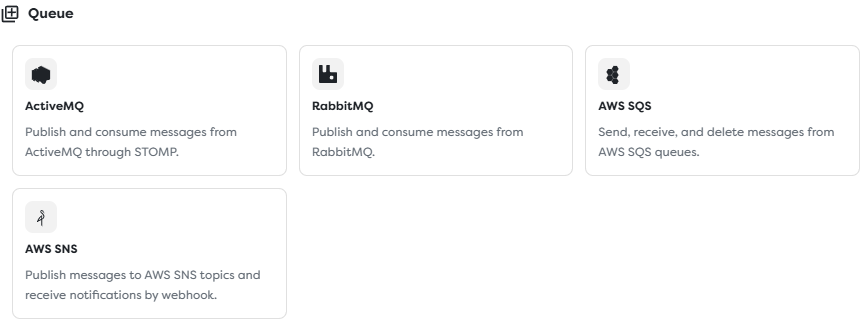
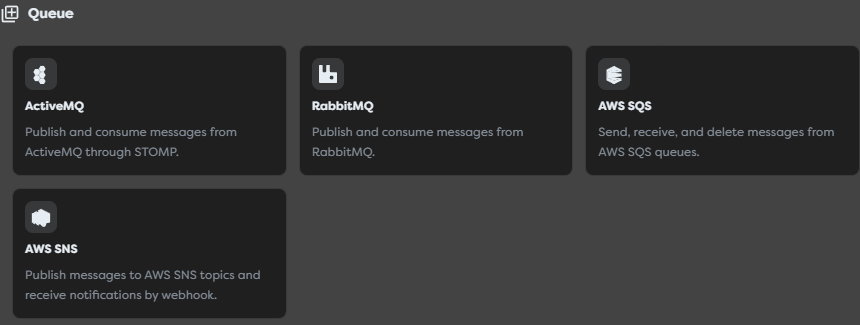
Builders exposes ActiveMQ, RabbitMQ, Amazon SQS, and Amazon SNS in the Queue integration category.
For the SQS example, create a saved integration with the queue's region and complete queue URL. Grant its AWS identity only the actions required by this workflow:
| Action | Why it is needed |
|---|---|
sqs:ReceiveMessage | Poll jobs from the source queue |
sqs:DeleteMessage | Complete a successfully processed delivery |
sqs:ChangeMessageVisibility | Extend or terminate visibility when the supported workflow design requires it |
sqs:GetQueueAttributes | Read queue metadata required by the adapter or monitoring |
Add sqs:SendMessage only if a Queue Action also publishes messages. Scope the policy to the source queue ARN instead of *; consult the Amazon SQS API permissions reference.
Keep AWS keys in the integration. Do not put them in Code, templates, screenshots, message bodies, or logs. The LocalStack URL shown in the reference screenshots is a non-working documentation placeholder, not a production queue.
2. Inspect one real delivery
Create a dedicated pipeline named Queue-Driven Processing, then add Queue Trigger followed by Render in its first version. Label the blocks Receive Queue Job and Inspect Queue Message, then render {{input}}.


Publish the version and enqueue one non-sensitive message with a unique jobId. Inspect the trigger output before writing templates or Code paths. Provider adapters can expose different names and nesting for the body, message ID, receipt handle, receive count, attributes, source, and correlation metadata.
Record the actual paths for:
| Required value | Purpose |
|---|---|
| Message body | Business job submitted by the producer |
| Provider message ID | Delivery diagnostics and correlation |
| Current receipt handle | SQS deletion or visibility change for this receive |
| Receive count | Retry and poison-message diagnostics |
| Queue identity | Prevents identifiers from different queues being mixed |
An SQS message ID is not a receipt handle. A new receive can produce a new receipt handle for the same message, and deletion requires the most recently received handle. See Amazon SQS queue and message identifiers.
Remove the Render block after the payload contract is known. Do not retain raw bodies or receipt handles in routine logs.
3. Configure bounded intake
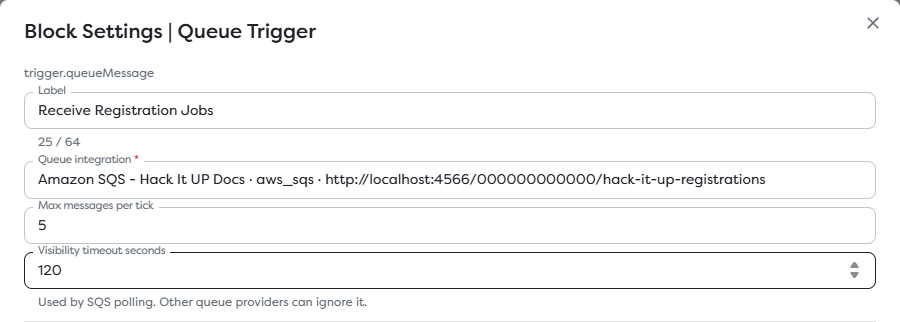
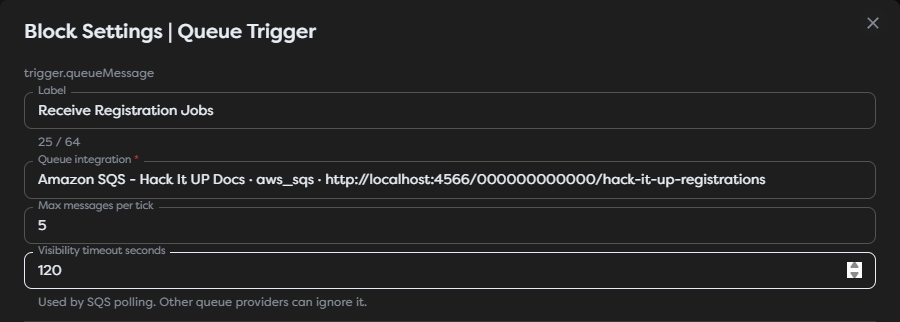
Open Receive Queue Job, select the saved SQS integration, and set conservative intake values.
| Setting | Initial example | Selection rule |
|---|---|---|
| Max messages per tick | 5 | Keep the batch below measured workflow and downstream capacity |
| Visibility timeout seconds | 120 | Cover normal processing and acknowledgement with operational margin |
Max messages per tick limits one polling request; it does not guarantee total workflow concurrency. Visibility timeout seconds limits temporary invisibility; it does not prevent every duplicate and does not replace an idempotency record.
For work whose duration can exceed the configured visibility timeout, use a supported visibility-extension strategy or split the job into smaller queued stages. Do not continually extend a stuck message without a deadline, retry policy, and DLQ.
4. Define the producer contract
Make producers send a versioned business job rather than an opaque command or provider-specific envelope:
{
"schemaVersion": 1,
"jobId": "registration-export-2026-08-21-001",
"type": "registration.export",
"requestedAt": "2026-08-21T10:15:00Z",
"payload": {
"eventId": "hack-it-up",
"format": "csv"
}
}
The producer owns jobId. It must remain stable when the producer retries the same logical request and change for a genuinely new request. Do not derive it only from body text, because two legitimate jobs can contain identical values.
Define a JSON Schema or equivalent producer contract with:
- a supported integer
schemaVersion; - a non-empty
jobIdwith a bounded length and character set; - an allowlisted
type; - a bounded
payloadwith no unexpected properties where practical; - timestamps in a documented format;
- no credentials or unnecessary personal data.
5. Normalize and validate the job
Replace the inspection block with a Code block named Normalize Job. Adapt the illustrative provider paths below to the actual trigger output:
export async function run(input: any, ctx: BuildersRuntimeContext) {
const delivery = input?.queueMessage ?? input ?? {};
const rawBody = delivery.body;
const body = typeof rawBody === "string" ? JSON.parse(rawBody) : rawBody;
const messageId = String(
delivery.messageId ?? delivery.MessageId ?? ""
).trim();
const receiptHandle = String(
delivery.receiptHandle ?? delivery.ReceiptHandle ?? ""
).trim();
const receiveCount = Number(
delivery.receiveCount ??
delivery.attributes?.ApproximateReceiveCount ??
1
);
const jobId = String(body?.jobId ?? "").trim();
const jobType = String(body?.type ?? "").trim();
if (!messageId || !receiptHandle) {
throw new Error("Queue delivery identity is incomplete.");
}
if (body?.schemaVersion !== 1) {
throw new Error("Unsupported queue job schema version.");
}
if (!jobId || jobId.length > 160) {
throw new Error("A bounded jobId is required.");
}
if (!new Set(["registration.export"]).has(jobType)) {
throw new Error("Unsupported queue job type.");
}
return {
job: {
schemaVersion: body.schemaVersion,
jobId,
type: jobType,
requestedAt: body.requestedAt,
payload: body.payload
},
delivery: {
messageId,
receiptHandle,
receiveCount
},
idempotencyKey: `queue:${jobType}:${jobId}`
};
}
Do not copy this field mapping without inspecting a real run. A body can be a JSON string, and adapters do not have to use the same casing or nesting. Throwing on invalid input deliberately prevents the success path and acknowledgement; the provider retry and DLQ policy then decide what happens next.
The Code examples use the Builders runtime contract. Keep the related API articles available while adapting them:
| Runtime surface | Reference |
|---|---|
BuildersRuntimeContext | BuildersRuntimeContext |
ctx.log | ctx.log |
ctx.fetch | ctx.fetch |
6. Acquire an atomic lease
Add Code named Acquire Lease. It must call a durable service that atomically creates or compares one record by idempotencyKey. A read followed by a separate write is unsafe: two runs can both observe no row and perform the same effect.
The service should return one of these states:
| State | Meaning | Workflow behavior |
|---|---|---|
acquired | This run owns a new or expired lease | Continue to execution |
completed | An earlier run durably completed the job | Skip the business effect and acknowledge this duplicate |
busy | Another non-expired lease owns the job | Fail without acknowledging; retry later |
An illustrative HTTP boundary using ctx.fetch looks like this:
export async function run(input: any, ctx: BuildersRuntimeContext) {
const response = await ctx.fetch(
"https://idempotency.example.internal/v1/leases/acquire",
{
method: "POST",
headers: { "content-type": "application/json" },
body: JSON.stringify({
key: input.idempotencyKey,
owner: input.delivery.messageId,
ttlSeconds: 300
})
}
);
if (!response.ok) {
throw new Error(`Lease service returned ${response.status}.`);
}
const lease = await response.json();
if (lease.state === "busy") {
throw new Error("Job is already leased by another worker.");
}
if (!new Set(["acquired", "completed"]).has(lease.state)) {
throw new Error("Lease service returned an invalid state.");
}
return {
...input,
lease,
skipExecution: lease.state === "completed"
};
}
Replace the example URL and authentication with your internal service contract. Keep authentication material in a supported protected resource, not in the script. A lease expiry recovers abandoned work; the completed record must live longer than the queue retention and expected replay window.
7. Execute the business effect idempotently
Add Code named Execute Job. If skipExecution is true, return without repeating the effect. Otherwise call the bounded downstream operation and send the same idempotency key when that service supports one:
export async function run(input: any, ctx: BuildersRuntimeContext) {
if (input.skipExecution) return input;
const response = await ctx.fetch(
"https://exports.example.internal/v1/registration-exports",
{
method: "POST",
headers: {
"content-type": "application/json",
"idempotency-key": input.idempotencyKey
},
body: JSON.stringify(input.job.payload)
}
);
if (!response.ok) {
throw new Error(`Export service returned ${response.status}.`);
}
const result = await response.json();
return {
...input,
result: {
exportId: String(result.exportId ?? ""),
status: String(result.status ?? "accepted")
}
};
}
The downstream idempotency key matters because a worker can crash after the external effect succeeds but before Finalize State commits. A lease by itself cannot prevent that retry from repeating a non-idempotent payment, email, export, or mutation.
Keep the work bounded. For a long export, enqueue a smaller stage or submit an idempotent asynchronous job and store its external job identifier instead of keeping one queue delivery in flight indefinitely.
8. Finalize durable state
Add Code named Finalize State. If the lease service reported completed, preserve that state. Otherwise atomically change the acquired record to completed, conditional on the lease token or version returned by Acquire Lease.
export async function run(input: any, ctx: BuildersRuntimeContext) {
if (input.skipExecution) return input;
const response = await ctx.fetch(
"https://idempotency.example.internal/v1/leases/complete",
{
method: "POST",
headers: { "content-type": "application/json" },
body: JSON.stringify({
key: input.idempotencyKey,
leaseToken: input.lease.token,
result: input.result
})
}
);
if (!response.ok) {
throw new Error(`Completion store returned ${response.status}.`);
}
return { ...input, completion: { durable: true } };
}
Do not convert a completion failure into { ok: false } and continue. Throw so that the acknowledgement block cannot execute. Log only the idempotency key, state, latency, receive count, and safe result identifiers; exclude bodies, secrets, receipt handles, and personal data.
9. Acknowledge only the completed delivery
Add Queue Action named Acknowledge Message after Finalize State. Select the same queue integration and choose Acknowledge / delete message. Map the exact current receipt handle from the normalized delivery output.
For SQS, successful deletion completes only that provider delivery. It does not create the durable business completion record, which is why the acknowledgement is last. Never use messageId, jobId, a receipt handle from an earlier receive, or a constructed string in place of the current receipt handle.
If deletion times out, the message can return even though the delete request may have reached the provider. Do not blindly repeat the external effect. The next delivery must use the durable completed state to skip execution and attempt acknowledgement with its new receipt handle.
For RabbitMQ or ActiveMQ, adapt this step to the delivery tag or acknowledgement identifier exposed by the same receive and integration. For Amazon SNS, there is no SQS-style receipt handle; use a durable internal handoff when downstream processing must outlive the webhook response.
10. Publish and test failure boundaries
Save the draft and publish the intended version. Send one uniquely identifiable test job at a time and inspect both the Builders run and the provider queue state.
| Test | Expected result |
|---|---|
| Valid new job | Lease is acquired, effect runs once, completion is stored, and the message is deleted |
| Same business job with a new provider message | Completed state skips the effect; the new delivery is deleted |
| Same delivery is redelivered | Completed state skips the effect; the current receipt handle is used |
| Invalid JSON or schema | Execution and acknowledgement do not run; provider retry and DLQ policy apply |
| Lease service unavailable | No effect and no acknowledgement |
| Another worker owns a valid lease | No effect and no acknowledgement; a later retry re-evaluates state |
| Downstream service fails before applying the effect | No completion and no acknowledgement |
| Downstream effect succeeds but finalization fails | Redelivery is safe only if the downstream operation honors the same idempotency key |
| Finalization succeeds but deletion times out | Redelivery observes completed, skips the effect, and retries deletion with the current handle |
| Processing exceeds visibility timeout | Duplicate delivery may occur; idempotency still prevents another effect |
| Receive count exceeds the redrive policy | Provider moves the poison message to the DLQ |
Monitor queue depth, age of the oldest message, in-flight messages, receive count, DLQ depth, lease contention, expired leases, duplicate completions, execution latency, acknowledgement failures, Builders run failures, concurrent runs, and compute usage.
Troubleshoot queue processing
| Symptom | Check |
|---|---|
| No published run starts | Published version, queue URL and region, integration ownership, IAM policy, and competing consumers |
| Trigger receives messages but body fields are empty | Actual Render output, JSON string parsing, casing, and adapter-specific nesting |
| The same effect happens twice | Atomic claim, completed-record retention, downstream idempotency key, and crash between effect and finalization |
| Message returns during a running job | Visibility timeout, processing latency, supported extension strategy, and concurrency |
| Delete or acknowledge fails | Current receipt handle or delivery tag from the same receive and selected integration |
| Message never reaches the DLQ | Source queue redrive policy, maxReceiveCount, receive attempts, and DLQ permissions |
| Valid transient failures reach the DLQ too quickly | Increase maxReceiveCount based on measured retry behavior |
| Queue backlog grows | Intake, run concurrency, downstream rate limits, failure rate, and average processing time |
| Old work overwrites new state | Carry an entity version or sequence and reject stale writes atomically |
| Logs expose sensitive delivery data | Remove bodies, receipt handles, credentials, and personal fields from runtime messages |
Production checklist
- Source queue, DLQ, redrive policy, retention, encryption, and alarms are configured.
- IAM access is scoped to the intended queue and required actions.
- Producer schema and
jobIdretry behavior are documented. - Real trigger output was inspected before field paths were mapped.
- Validation rejects unsupported versions, types, and oversized values.
- The lease acquisition is atomic and its expiry is bounded.
- Completed records outlive all expected retries and replays.
- Every non-repeatable downstream effect has its own idempotency protection.
- Completion is durable before Queue Action can execute.
- The current receipt handle or delivery tag is preserved without logging it.
- Visibility timeout, batch size, concurrency, retry count, and downstream capacity were load-tested together.
- Failure tests cover every boundary between receive, effect, completion, and acknowledgement.