
Troubleshooting Integrations
Integration failures rarely come from one universal connection state. A saved record can be visible in the catalog while its credential is expired, a provider API can accept outbound calls while its webhook is misconfigured, and an MCP-enabled connection can still be unavailable to a project with a different owner.
Diagnose the narrowest failing boundary before replacing credentials or deleting an integration.
Locate the failing boundary
Start with the first check that fails. Do not use a later successful check as proof that an earlier or parallel path is healthy.
| Boundary | Check | A failure usually points to |
|---|---|---|
| Catalog record | The integration appears in Integrations | The record was not saved, was deleted, or belongs to another account |
| Project access | A compatible block can select it | Owner type, owner, project scope, integration type, or block compatibility |
| Form validation | Required fields are accepted | Missing values, malformed URLs, invalid JSON, or an unsupported field combination |
| Connection test | Test connection succeeds | Endpoint reachability, DNS, TLS, credentials, provider authorization, or the connector's test operation |
| Workflow operation | A minimal block read or write succeeds | Operation-specific permission, resource identifier, payload, quota, or provider policy |
| Inbound event | A published trigger creates a run | Callback registration, polling, subscription, signature, event filter, or publication state |
| AI tool | The tool is Ready and completes a call | MCP support, MCP permission, tool allowlist, integration selection, model arguments, or provider permission |
| Production run | The published version behaves like the test | Published version, environment-specific values, runtime reachability, concurrency, retries, or limits |
Use this order:
integration exists
-> project can select it
-> Test connection succeeds
-> one minimal provider operation succeeds
-> one real inbound event succeeds, when applicable
-> the complete published workflow succeeds
For an AI Agent, insert the MCP checks after project access and before the provider operation.
Read the Integrations list correctly
The Integrations list describes saved configuration, ownership, and MCP eligibility. It is not a live provider health dashboard.
- A row proves that an integration record exists.
- Its owner determines which personal or team projects may select it.
- MCP: Yes means supported AI tools may use it; it does not mean the credential is currently valid.
- A successful connection test proves only the adapter-specific check that ran at that moment.
When a workflow cannot select a connection, resolve type and ownership before rotating secrets. When it can select the connection but provider calls fail, continue with the connection and operation checks.
Use Test connection as a boundary check
Open the integration, review its Config step, and select Test connection. Wait for the result before navigating away.
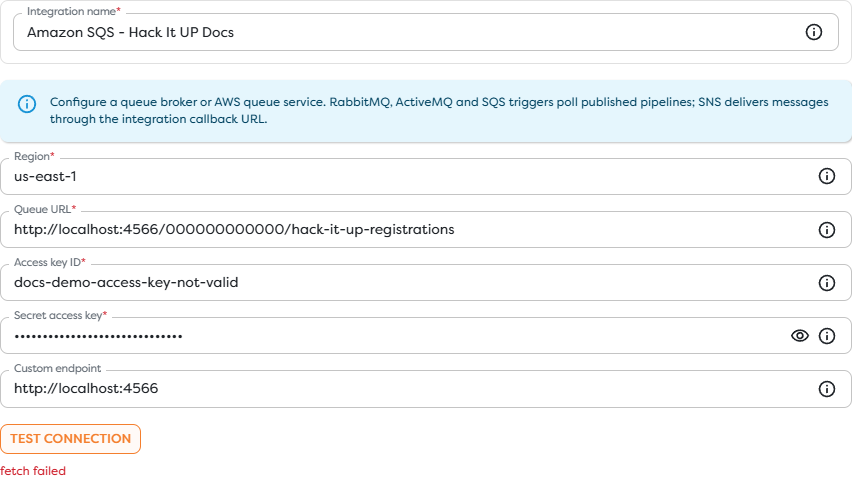
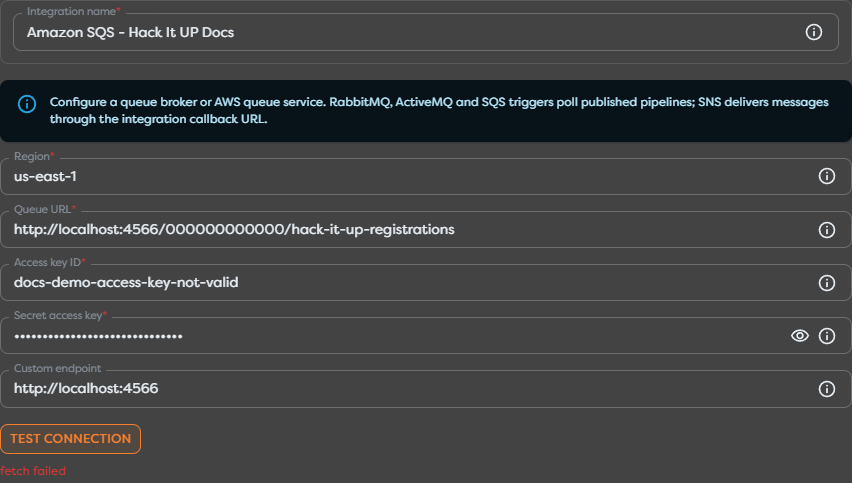
In this controlled example, fetch failed appears for an inactive local SQS endpoint. The result identifies a transport or reachability failure before a successful provider response. It does not prove that the access key is invalid or that the queue policy denied the request.
Classify the result before changing configuration:
| Result pattern | Investigate first |
|---|---|
| Validation message before the request | Required field, URL format, port, region, or JSON syntax |
fetch failed, timeout, DNS, or connection refused | Runtime reachability, hostname, port, proxy, firewall, TLS, or custom endpoint |
401, invalid token, invalid signature, or authentication failed | Credential value, token expiry, signing region, account, clock, or authentication method |
403, access denied, or insufficient scope | Provider role, consent, resource policy, explicit deny, or organization control |
404, resource not found, or unknown queue/channel/project | Base URL plus resource identifier, account or tenant, region, renamed resource, or visibility |
409, duplicate, or state conflict | Existing resource state, idempotency key, optimistic lock, or repeated delivery |
429 or quota exceeded | Provider quota, rate limit, concurrency, backoff, or account plan |
5xx | Provider availability, self-hosted service health, gateway, or a connector defect |
Record the exact message, timestamp, integration type, test environment, and provider request or correlation ID when available. Redact passwords, tokens, private keys, authorization headers, webhook signatures, and sensitive payload fields.
Test one ordinary operation
A connection test is intentionally narrower than a workflow operation. After it succeeds, create a minimal reversible test that uses the same owner scope and credential class as the intended workflow.
- Select the integration in the smallest compatible block.
- Read a known resource or write a uniquely named disposable resource.
- Run the block with representative, non-sensitive input.
- Inspect the block status, logs, structured output, and Error route.
- Match the result with the provider audit or delivery log.
- Remove the disposable resource when the test finishes.
If the connection test succeeds but the operation receives 403, the connection is reachable and authenticated but lacks permission for that operation or resource. If it receives 404, verify the resource identifier in its provider scope rather than recreating the integration immediately.
Inspect the workflow evidence
Use the Builders run and the provider record together:
| Evidence | What to capture |
|---|---|
| Builders run | Run ID, pipeline version, trigger source, start time, final status, and failed block |
| Block details | Block ID, safe input summary, error output, retry count, and duration |
| Provider log | Request or delivery ID, HTTP status, provider error code, event type, and provider timestamp |
| External result | Resource ID, destination, final state, or confirmation that no side effect occurred |
Wait until the run reaches a terminal state before recording the result. A live inspector can update while a workflow is still executing.
Do not add secrets to ctx.log, block labels, test input, screenshots, or incident notes. Log stable resource and correlation identifiers instead.
Troubleshoot inbound callbacks
Outbound API authorization and inbound callback delivery are independent. An integration may send successfully while its trigger receives nothing.
- Save the integration and reopen it before copying any generated callback URL.
- Copy the exact callback URL into the provider console.
- Configure the same verification or signing secret on both sides when required.
- Subscribe only to the event types used by the workflow.
- Publish the pipeline version containing the intended trigger.
- Send one uniquely identifiable real event.
- Inspect the provider delivery history before the Builders run list.
Interpret the provider delivery:
- No delivery attempt: the provider subscription, event filter, app state, number route, or repository/project selection is wrong.
- DNS, TLS, or timeout failure: the callback is not publicly reachable from the provider.
401or403: verification, signature, secret, or provider authorization failed.404: the copied callback is incomplete, stale, or belongs to another integration.- Successful response but no expected workflow behavior: confirm the published trigger, event shape, filters, and downstream Error routes.
Preserve provider delivery IDs for deduplication. A redelivery can be legitimate, so side effects should be idempotent.
Troubleshoot polling triggers
Email, queue, and some provider triggers poll instead of receiving a direct webhook. For these integrations, check:
- the pipeline is published and the polling trigger uses the intended integration;
- the mailbox, folder, queue, region, virtual host, or subscription is exact;
- the runtime can reach the provider or custom endpoint;
- the credential can list or receive, not only send or publish;
- the test item was created after any initial cursor, UID, or baseline was established;
- polling interval, visibility timeout, acknowledgement, deletion, and retry behavior allow the item to appear;
- another consumer did not claim or remove the item first.
Test with one uniquely identifiable message and allow at least one complete polling interval before concluding that no event arrived.
Troubleshoot MCP and AI tools
An AI integration path has additional independent gates:
project owner
-> compatible integration in that scope
-> connector implements the requested MCP tool
-> Allow MCP usage is enabled
-> the tool is enabled in the AI Agent block
-> that integration is selected for the tool
-> provider permission allows the requested operation
Use the tool status to narrow the problem:
- Needs integration: create or expose a compatible integration in the project's ownership scope.
- MCP disabled: enable Allow MCP usage, complete the wizard through Summary, save, and reopen the tool configuration.
- Ready but no tool call occurs: inspect the model instructions, tool allowlist, tool choice, and block logs.
- Tool call occurs but fails: inspect its arguments, provider permission, destination policy, credential expiry, and the AI block's Error output.
Disabling MCP does not disable ordinary deterministic blocks. Revoke or replace the underlying integration when all access must stop.
Rotate an expired or compromised credential
Do not delete the integration as the first recovery step. Deletion can remove the stable binding used by several workflows and can make the blast radius harder to inventory.
- Identify every personal and team project that uses the integration.
- Pause sensitive triggers or publishing paths when the credential may be compromised.
- Create the replacement credential with the minimum required provider permissions.
- Update the existing integration when the product supports in-place replacement.
- Run Test connection.
- Test one read, one required write, and one inbound event where applicable.
- Republish or rebind only when the workflow configuration changed.
- Revoke the old credential at the provider.
- Monitor failures and unauthorized attempts during the defined observation window.
- Record owner, expiry, rotation date, and affected systems without recording the secret.
If in-place replacement is unavailable, create a new integration in the same owner scope, rebind and test every dependent workflow, then remove the old record after the migration is verified.
Check provider-specific symptoms
| Category | Symptom | First checks |
|---|---|---|
| File storage | Connection works but a file is denied | Exact drive, bucket, path or prefix; sharing; object and KMS policy; renamed ancestors |
| Sending works but no email trigger starts | Inbox authorization, mailbox or folder, polling baseline, published trigger, Gmail or Microsoft Graph consent | |
| Messaging | Sending works but no message trigger starts | Events API or webhook registration, subscription, callback verification, number or bridge route |
| Queue | Publishing works but consuming does not | Receive permission, queue or subscription, region or virtual host, polling, visibility, acknowledgement, competing consumers |
| Issue management | API action works but Issue Trigger does not | Repository or project webhook, event selection, callback secret, provider delivery history, published trigger |
| AI tools | Integration is configured but unavailable | Project owner scope, connector MCP support, Allow MCP usage, tool enablement, selected connection |
Use the category article for provider-specific credential sources, scopes, callbacks, and test procedures.
Recover in the safest order
When the cause is still unknown, use this recovery sequence:
- Preserve the failing run and provider evidence.
- Confirm the selected integration and published pipeline version.
- Confirm project ownership and connector compatibility.
- Reproduce with a minimal reversible operation.
- Test reachability and authentication with Test connection.
- Correct the narrowest field, permission, subscription, or resource selector that explains the evidence.
- Retest the failed boundary and then the complete workflow.
- Rotate credentials only when expiry, revocation, exposure, or authentication evidence justifies it.
- Delete an integration only after all dependents are migrated or intentionally retired.
This order preserves evidence and avoids turning one known failure into several unrelated configuration changes.
Next steps
- Integration Catalog and Status
- Credentials and Configuration Reference
- Integration Ownership and MCP Access
- File Storage Integrations
- Email Integrations
- Messaging Integrations
- Queue Integrations
- Issue and Project Management Integrations
- Read Block Logs and Output
- Browse Run History
- Run Published Workflows