
Slack Message Trigger
Use a Slack Message Trigger to start a published workflow when Slack delivers a subscribed message event. Builders receives the event through the callback URL assigned to a Slack integration, verifies the request with the integration's signing secret, and sends the message context through the trigger's Out port.
This article uses the separate Documentation - Slack Message Trigger pipeline in the Hack It UP - event project. Its example path receives a registration question from Slack and sends the complete input to a Render Block for inspection.
Prepare a Slack app
Create or select a Slack app for the workspace that will send events. Slack's app quickstart covers app creation and installation.
Under OAuth & Permissions, add only the bot scopes required for the conversations the workflow must observe:
| Conversation | Bot event | Required history scope |
|---|---|---|
| Public channel | message.channels | channels:history |
| Private channel | message.groups | groups:history |
| Direct message | message.im | im:history |
| Multiparty direct message | message.mpim | mpim:history |
The Slack message event reference explains the message variants and their permission requirements. Add chat:write only when the workflow also uses a Slack Action to post or reply. Install or reinstall the app after changing its scopes.
Copy these values from the Slack app settings:
- the Bot User OAuth Token from OAuth & Permissions, normally beginning with
xoxb-; - the Signing Secret from Basic Information.
Invite the bot to every channel it must observe. An installed app does not automatically receive every message in the workspace, and private conversations remain limited by both membership and granted scopes.
Create the Builders integration
Open Integrations, create a Slack integration, and provide an integration name, bot token, signing secret, and optional default channel ID. Assign it to the same user or team ownership scope as the project.
Save the integration once, then reopen it. Builders now displays the unique Webhook callback URL that must be registered in Slack.
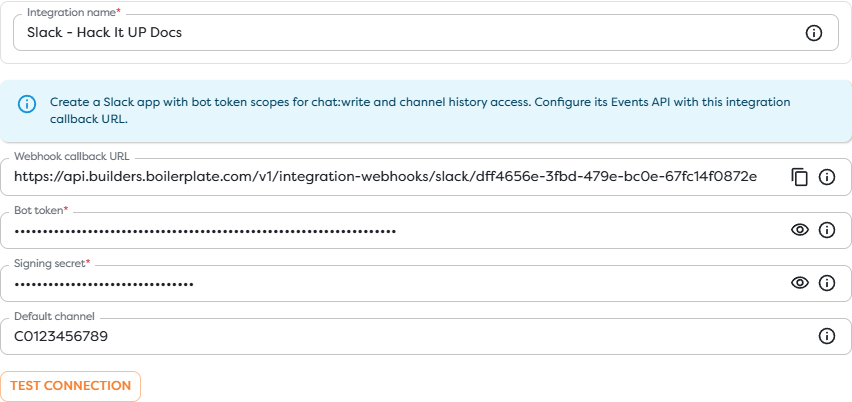
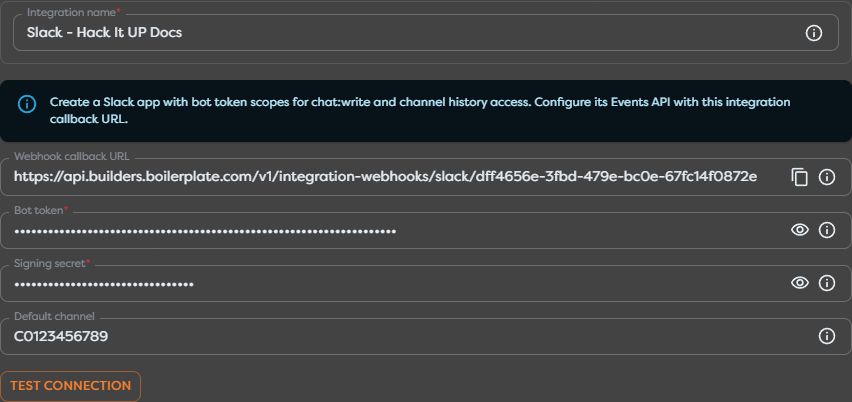
The default channel is a fallback for Slack Action blocks. It does not restrict which message events start Slack Message Trigger. Channel selection is controlled by Slack subscriptions, app membership, permissions, and downstream filtering.
Use Test connection with real credentials before building the workflow. A successful connection test confirms that the bot token can reach Slack; live message delivery still requires the Events API setup in the next section.
Register the Events API callback
In the Slack app settings, open Event Subscriptions and enable events. Paste the Builders webhook callback URL into Request URL and wait for Slack to mark it as verified.
Slack sends a url_verification challenge when a request URL is registered. Builders handles that handshake for the integration callback. Request URLs are case-sensitive and must remain reachable over HTTPS. See Slack's HTTP Request URL guide for the verification flow.
Under Subscribe to bot events, add the message event types required by the workflow:
message.channelsfor public channels;message.groupsfor private channels;message.imfor direct messages;message.mpimfor multiparty direct messages.
Do not subscribe to conversation types the automation does not need. Every additional subscription increases event volume and broadens the app's access. Slack's Events API documentation describes subscriptions, delivery, acknowledgements, retries, and rate limits.
Configure Slack Message Trigger
Drag Slack Message Trigger from Triggers onto the Designer canvas and open its settings. Select the Slack integration that owns the callback configured above.


The trigger has one provider setting: Messaging integration. It does not contain channel, sender, keyword, or subtype filters. Use the Slack app configuration to define which event families can arrive, then filter individual events immediately downstream.
If the block is muted and cannot be dragged, disable Hide unavailable blocks and read its availability message. Slack Message Trigger requires an active Slack integration accessible within the project's ownership scope.
Connect the incoming path
Connect the trigger's Out port to the first block that should inspect or normalize every received message. During development, use a Render Block with {{input}} so the run exposes the complete payload before templates depend on individual fields.


The example edge is labeled New Slack message. After the input shape is confirmed, replace or extend the inspection step with conditions, transformations, database writes, AI processing, or Slack actions.
Inspect the message context
Slack wraps each subscribed event in an Events API envelope. The exact normalized Builders input can vary with the event type and message subtype, so inspect a real published run and use Designer autocomplete before committing template paths.
Common data groups to locate include:
| Data group | Typical Slack values |
|---|---|
| Delivery identity | Event ID, event time, app ID, and workspace or team ID. |
| Conversation | Channel ID and conversation type such as channel, private group, direct message, or multiparty direct message. |
| Sender | User ID, bot ID, app ID, and related sender metadata when supplied. |
| Message | Text, message timestamp, event timestamp, subtype, blocks, and attachments or files when present. |
| Thread | thread_ts for a reply, plus the message timestamp used to identify the current message. |
| Authorization | Workspace and installation context included by Slack for the delivered event. |
Start with {{input}}, run one controlled event, and inspect the Render Block output. Then replace broad inspection with exact expressions selected from the observed payload. Do not assume that a top-level Slack field has the same path after Builders normalization.
When a later Slack Action uses Reply, Builders can use the incoming Slack thread timestamp when it is available. Test both a top-level channel message and a thread reply because their timestamp context differs.
Filter before expensive work
Slack message subscriptions can deliver more than newly typed human messages. Message edits, deletions, bot messages, file shares, and other subtypes may use the same message event family.
Add a Condition or Transform block directly after the trigger and decide which events should continue. Useful checks include:
- allowlisted channel IDs;
- allowed user IDs or roles;
- required text, mention, command prefix, or structured block content;
- supported message subtypes;
- whether the event was produced by the same bot or app;
- thread-only or top-level-message-only behavior.
Filtering bot-generated messages is especially important when the workflow posts back to a subscribed channel. Without that guard, the workflow can react to its own Slack Action and create a loop.
Treat message text, file metadata, and link content as untrusted input. Validate values before using them in code, database queries, file paths, HTML, AI tools, or privileged provider actions.
Publish and test a live event
Slack events start live runs only for the published pipeline version. Save the graph and publish the intended version before testing the provider callback.
- Confirm that the Slack integration passes Test connection.
- Confirm that Slack shows the Builders request URL as verified.
- Check the required bot event subscription and OAuth history scope.
- Reinstall the Slack app if its scopes changed.
- Invite the bot to the test channel when channel membership is required.
- Post one message with a unique marker, such as
Hack It UP registration question 2026-08-20. - Open the resulting published run and inspect the trigger and first downstream block.
Confirm the workspace, channel, sender, text, message timestamp, thread timestamp, subtype, and event ID against the original Slack event. A Designer test run or a successful Slack Action does not verify Events API delivery to the trigger.
Handle retries and duplicates
Slack expects an HTTP success response quickly and retries failed deliveries. The Events API retry documentation describes retry attempts and the x-slack-retry-num and x-slack-retry-reason headers.
Builders handles the provider callback, but downstream effects should still be idempotent:
- Build a deduplication key from the Slack event ID and workspace context.
- Check whether the business effect already completed.
- Record the key atomically with that effect when possible.
- Preserve the Builders run ID, Slack event ID, channel ID, and message timestamp for investigation.
Do not deduplicate only by message text. The same text can legitimately appear in different channels, threads, workspaces, or events.
Secure the callback
Keep the bot token and signing secret in the Builders integration. Do not paste either value into block settings, workflow JSON, Vault templates, screenshots, or logs.
Slack signs callback requests with the app's signing secret. Builders uses the configured secret to authenticate inbound Events API requests. Slack's request verification guide explains the signature and timestamp mechanism.
Rotate a compromised bot token or signing secret in Slack and immediately update the Builders integration. Re-test the connection and request URL before returning the published workflow to normal traffic.
Troubleshoot Slack events
- Slack Message Trigger is unavailable: create an active Slack integration in the same user or team scope as the project, then reload the Designer.
- The request URL is not verified: reopen the saved integration, copy the complete callback URL, preserve its case, and confirm that the signing secret matches the Slack app.
- The connection test fails: verify the
xoxb-bot token, reinstall the app, and confirm that the token belongs to the intended workspace. - Public channel messages create no run: subscribe to
message.channels, grantchannels:history, invite the bot when required, and publish the pipeline. - Private channel messages create no run: subscribe to
message.groups, grantgroups:history, and explicitly invite the bot to the private channel. - Direct messages create no run: subscribe to
message.imormessage.mpimand grant the matching history scope. - Only some channels work: compare bot membership and permissions between a working and failing channel.
- A changed scope has no effect: reinstall the Slack app so the workspace grants the updated OAuth scopes.
- The workflow triggers on edits or bot posts: inspect the message subtype and sender metadata, then reject unsupported or self-generated events downstream.
- The same effect happens more than once: deduplicate by Slack event identity before performing the external action.
- A Slack Action succeeds but the trigger does not: outbound Web API access and inbound Events API delivery are separate; verify the callback, subscriptions, and publication independently.
Next steps
- Trigger Blocks
- Use Template Expressions
- Read Block Logs and Output
- Run Published Workflows
- Messaging Integrations
The next article will cover Twilio SMS Trigger.