
Twilio SMS Action
Use Twilio SMS Action to send a text message, reply to an inbound SMS, or read message records through a Twilio integration available to the project. The block exposes separate Out and Error ports and uses Twilio Programmable Messaging rather than a generic HTTP request.
This article uses the Twilio - Hack It UP Docs integration and sends a registration confirmation for the Hack It UP - event project.
Prepare the Twilio integration
Create and test a Twilio SMS integration before adding the block. The integration stores the Account SID and Auth Token plus an optional default From number, Messaging Service SID, or both.
Choose the outbound sender model deliberately:
| Sender model | Configure | Use when |
|---|---|---|
| Direct sender | An SMS-capable Twilio From number | One known Twilio number should send the messages. |
| Messaging Service | A Twilio Messaging Service SID with an eligible sender pool | Twilio should select and manage the sender according to service configuration. |
| Per-block override | From in Twilio SMS Action | A particular run must use an authorized sender different from the integration default. |
The Account SID and Auth Token must belong to the same Twilio account. A configured number, Messaging Service, or sender identity does not bypass geographic, carrier, account, registration, trial-account, consent, or content restrictions.
Use Twilio's Messages resource and Messaging Services references for the provider-side behavior. Protect the Auth Token as an account credential; never place it in block fields, Vault templates, logs, or screenshots.
Configure Twilio SMS Action
Drag Twilio SMS Action from the Process group onto the Designer canvas and open its settings.
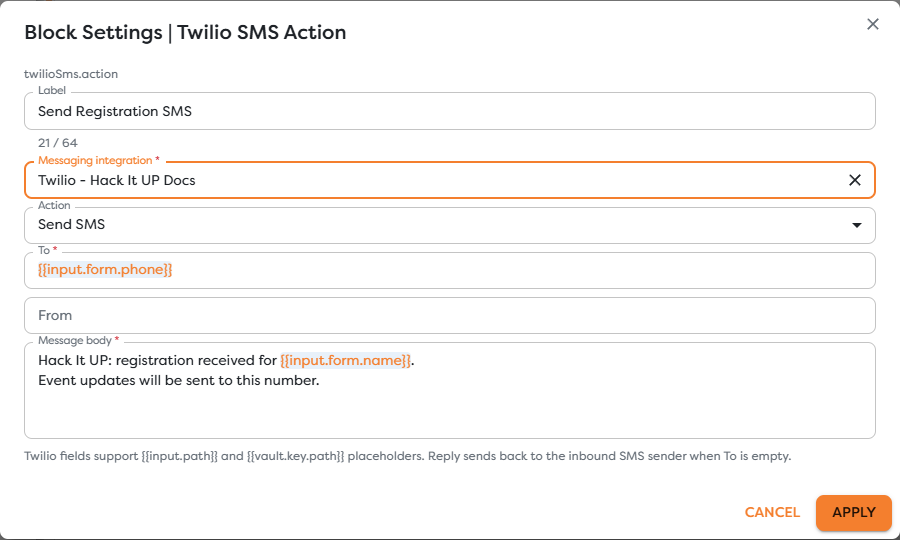
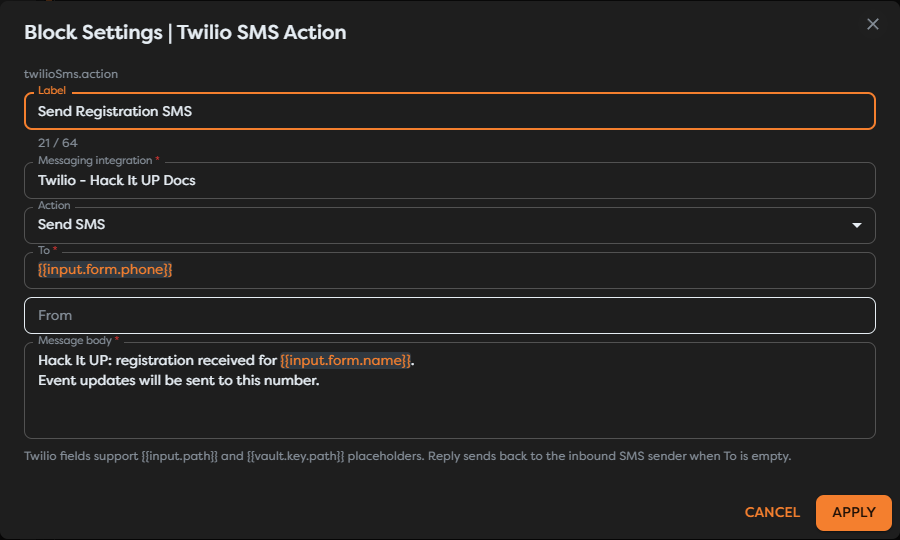
| Field | Required | Purpose |
|---|---|---|
| Label | Yes | Identifies the step in the graph, run trace, and logs. |
| Messaging integration | Yes | Selects the saved Twilio account and sender configuration. |
| Action | Yes | Chooses Send SMS, Reply, or Read messages. |
| To | Send SMS | Supplies the recipient for a new message. It is optional for Reply and Read messages. |
| From | No | Overrides or filters by a sender. Leave it empty to use the integration's outbound sender configuration where supported. |
| Message body | Send SMS and Reply | Supplies the text after template resolution. |
| Limit | Read messages | Caps the returned records from 1 to 100; the default is 20. |
Twilio fields support {{input.path}} and {{vault.key.path}} expressions. Use Designer autocomplete after inspecting real upstream output so the block does not depend on guessed paths.
The current block sends text. Its settings do not expose media URLs, content templates, scheduling, or a status callback URL. Use the provider capabilities represented by the current fields and verify the operation selector after Builders updates.
Send a new SMS
Choose Send SMS when the workflow already knows the recipient. To is required for this operation.
The registration example maps the phone number submitted through the form:
{{input.form.phone}}
Its body combines fixed event context with the attendee name:
Hack It UP: registration received for {{input.form.name}}.
Event updates will be sent to this number.
Normalize and validate the recipient before the action. Use an internationally unambiguous format such as E.164 where the sender and destination support it. Do not infer a country code from a display format without a clear business rule.
Leave From empty to use the integration's default sender or Messaging Service. Set it explicitly only to an SMS-capable sender authorized by the same account and permitted for that destination. A Messaging Service can select a sender from its pool, so the final provider record remains the source of truth for which sender Twilio used.
Reply to an inbound SMS
Choose Reply after Twilio SMS Trigger when the workflow should answer the person who sent the incoming message. If To is empty, the block uses the inbound SMS sender when that context is available.
Prefer the reply behavior over reconstructing the recipient from free-form message content. When the action is not reached directly from a Twilio trigger, set To explicitly from validated workflow data.
The outbound sender must remain compatible with the inbound conversation. Use the same Twilio integration and verify whether its default From number or Messaging Service is the intended receiving identity. Test the exact country, number type, and sender configuration used in production.
Before enabling an automatic reply:
- Inspect one real trigger payload and preserve the normalized inbound sender and receiving number.
- Reject unsupported destinations and messages from numbers that must not receive a reply.
- Filter delivery callbacks and non-customer events so they do not enter the reply path.
- Deduplicate by the inbound
MessageSidand account context. - Apply consent, opt-out, quiet-hours, content, and frequency rules before the action.
Read message records
Choose Read messages to retrieve Twilio Message resources. The Message body field is replaced by Limit. Builders accepts values from 1 through 100 and starts at 20.
Use To and From as optional filters. Keep their direction in mind:
- for an outbound SMS, From is the Twilio sender and To is the customer;
- for an inbound SMS, From is the customer and To is the Twilio receiving number.
Use a small limit and narrow filters. Twilio message records can contain phone numbers, message bodies, error details, timestamps, and status data that should not be copied broadly into logs, AI prompts, or unrelated downstream systems.
The returned list can be smaller than the requested limit because of filters, account visibility, retention, or provider pagination. Treat the returned collection as the source of truth rather than assuming that Limit = 20 guarantees 20 records.
Understand message identifiers and status
Keep Twilio and Builders identifiers separate:
| Value | Typical shape | Meaning |
|---|---|---|
| Account SID | AC... | Twilio account authorization boundary. |
| Messaging Service SID | MG... | Optional service and sender-pool configuration. |
| Message SID | SM... or MM... | Unique Twilio Message resource. |
| To / From | Usually E.164 numbers | Destination and sender for a specific message direction. |
| Builders run ID | UUID | Workflow execution, not a Twilio Message resource. |
When Out runs after Send SMS or Reply, Twilio accepted creation of a Message resource and Builders received a successful API response. The initial status can be queued or accepted, depending on sender configuration. It is not proof of carrier delivery.
Twilio can later move an outbound message through statuses such as sent, delivered, undelivered, or failed. Delivery status callbacks are separate provider webhooks. Twilio documents this lifecycle in Outbound Message Status and Track Outbound Message Status.
Retain the Message SID so a run can be correlated with Twilio logs and later status changes. Do not treat a successful Designer test or queued response as end-to-end delivery evidence.
Control content, consent, and cost
SMS is a regulated and billable external effect. Before sending:
- obtain and retain the consent required for the sender, destination, message category, and jurisdiction;
- identify the sender clearly where required;
- honor opt-out requests before the next workflow reaches the action;
- apply frequency and quiet-hours controls appropriate to the use case;
- keep security codes, secrets, payment data, health data, and other sensitive content out of ordinary SMS unless the complete system is approved for it;
- monitor the number of SMS segments, not only the number of logical messages.
Twilio's current Messaging Policy describes consent, sender identification, and opt-out expectations for its service. Applicable law and carrier rules can impose additional requirements.
Character encoding and message length affect segmentation and cost. Templates that appear short before rendering can expand with user data. Inspect the returned segment count and provider logs with representative names, links, Unicode characters, and maximum expected values.
Connect success and error paths
Connect Out only to work that should continue after Twilio accepts the API operation. Connect Error to controlled logging, alerting, or recovery.
Preserve these values when available:
- Builders run ID;
- Twilio Message SID;
- sender and recipient in an appropriately protected log;
- initial provider status;
- segment count;
- provider error code;
- the business event or inbound Message SID used for deduplication.
A timeout is ambiguous because Twilio may have created the Message resource before Builders received the response. Check Twilio using the available correlation data before retrying. A blind retry can send the same SMS twice and incur duplicate cost.
Test Twilio SMS Action
- Use a controlled Twilio account, sender, and recipient that can legally receive the test.
- Confirm that the integration passes Test connection.
- Run Send SMS with a known E.164 recipient and verify the returned Message SID, sender, recipient, status, and segment count.
- Confirm the message on the receiving device and in Twilio message logs.
- Start a published run through Twilio SMS Trigger and test Reply with To empty.
- Run Read messages with a small limit and explicit To or From filter.
- Test an invalid destination, unauthorized sender, revoked credential, blocked recipient, and provider rejection through Error.
- Repeat the same workflow input and verify that deduplication prevents an unintended second SMS.
- Test consent withdrawal or opt-out handling before publishing the production path.
Test outbound API access, inbound webhook routing, and delivery status callbacks separately. Success in one direction does not verify the other two.
Troubleshoot Twilio SMS Action
- The block is unavailable: create an active Twilio SMS integration in the project's ownership scope, then disable Hide unavailable blocks while checking availability.
- No integration appears: verify its status, type, owner, team access, and the project owner shown in Builders.
- To is required: provide a validated recipient for Send SMS; Reply can leave To empty only when inbound Twilio context is available.
- Authentication fails: verify that the Account SID and Auth Token belong to the same account and have not been rotated.
- Twilio rejects From: use an SMS-capable sender owned by the account or let the configured Messaging Service select one.
- The wrong number sends the SMS: inspect the block's From override, integration default number, Messaging Service, and final Twilio message record.
- The recipient does not receive the message: inspect the Message SID, delivery status, error code, destination capability, geography, registration, opt-out state, carrier filtering, and trial restrictions.
- Read messages returns no records: reverse-check To and From direction, account scope, filters, and limit.
- The action sends duplicates: deduplicate before the block and resolve ambiguous timeouts against Twilio before retrying.
- The message costs more than expected: inspect encoding, rendered length, segment count, destination, sender type, and Twilio pricing.
Next steps
- Messaging Action Blocks
- Twilio SMS Trigger
- Configure Messaging Integrations
- Use Template Expressions
- Reference General Vault Values
- Read Block Logs and Output
- Build a Messaging Assistant
Continue with Signal Action to send, reply to, and read messages through a configured Signal bridge.