
Upload and Return Files
Endpoint and Web Form triggers can accept uploaded files as public workflow input. Builders represents each accepted upload as a file descriptor that downstream blocks can read, copy, attach to another request, persist, or return through a synchronous Endpoint response.
Treat every uploaded filename, media type, document, image, archive, and metadata field as untrusted input.
Choose the upload surface
| Surface | Upload contract | Best fit |
|---|---|---|
| Endpoint Trigger | One configured multipart field, single or multiple mode, size limit, and intake storage | Application or API client sending multipart/form-data |
| Web Form Trigger | One or more File fields with keys, accepted-type hints, per-file size, and intake storage | Person selecting files in a hosted browser form |
| Chat Trigger | No general visitor upload field described by the Chat Trigger contract | Use only documented chat attachment capabilities when available; do not assume form-style upload |
Use Endpoint when the caller needs a machine contract or a synchronous file response. Use Web Form when a person needs labels, help text, picker constraints, and a hosted submission flow.
Configure a Web Form File field
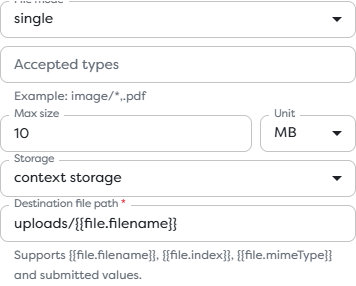
Add File to the form layout, then configure its key, label, mode, accepted types, maximum size, unit, storage, and destination path.
| Setting | Meaning |
|---|---|
| File mode | Produces one descriptor in single mode or an array in multiple mode |
| Accepted types | Browser file-picker hint such as image/*,.pdf |
| Max size and Unit | Per-file rejection threshold |
| Storage | Context or Static intake destination |
| Destination file path | Path template for the accepted file |
| Required | Browser and hosted-form requirement for submission |
An accept expression does not verify the bytes. A file renamed from an executable to .pdf can still pass a picker filter. Validate content signature, parsed structure, and policy downstream.
Configure an Endpoint multipart field
Enable Accept file in Endpoint Trigger and configure:
- single or multiple file mode;
- the exact multipart Field name expected from the caller;
- maximum size and unit;
- Context or Static storage;
- a destination path template.
GET endpoints do not accept file uploads. Use POST, PUT, or another method appropriate to the API contract.
Example request:
curl --request POST "$BUILDERS_UPLOAD_URL" \
--header "Authorization: Bearer $BUILDERS_ENDPOINT_TOKEN" \
--form 'metadata={"registrationId":"reg_01J..."};type=application/json' \
--form 'badgePhoto=@./badge.png;type=image/png'
The caller's multipart field name must match the trigger. Let the HTTP client generate the multipart boundary; do not manually set a bare Content-Type: multipart/form-data header that omits it. The MDN FormData guide explains browser multipart construction.
Choose intake storage
Public triggers provide Context and Static intake choices:
| Intake storage | Lifetime and scope | Use it when |
|---|---|---|
| Context | Temporary and isolated to the current run | The workflow reads, transforms, forwards, or discards the file during this execution |
| Static | Persistent in the applicable personal or team Builders drive | Another run or authorized user must access the file later |
External Google Drive, OneDrive, AWS S3, or Custom S3 storage is selected in downstream File blocks through an integration. A trigger can accept into Context, then pass the canonical file to Save File for the approved external destination.


Confirm project ownership before selecting Static storage. A team-owned pipeline uses the compatible team resource scope; moving the pipeline or changing project ownership can invalidate expected paths and access.
Generate collision-resistant paths
The default-looking path uploads/{{file.filename}} is easy to understand but can collide when visitors reuse filenames. It also gives untrusted input influence over a storage path.
Prefer a controlled prefix and a unique run or validated business identifier, for example:
registrations/{{run.id}}/badge-{{file.index}}
Preserve the original filename as metadata only when needed. Normalize separators, reject traversal patterns, enforce allowed prefixes, and never use a client filename as proof that the caller may overwrite an existing object.
Validate the accepted file
Apply controls in layers:
- Reject files beyond the trigger's configured per-file size.
- Limit single versus multiple mode and validate the resulting count.
- Compare extension and declared media type with the allowed policy.
- Inspect magic bytes or parse the file with a format-aware validator.
- Reject encrypted, nested, malformed, or unsupported archives according to policy.
- Scan untrusted content before making it available to staff or another system.
- Generate a controlled output name and destination.
- Record correlation and retention metadata without logging the file content.
Use registered media types from the IANA media type registry and provider-specific requirements. A declared MIME value is metadata supplied by a client or parser; it is not authorization.
Work with the file descriptor
Do not assume the upload becomes a raw byte string in trigger input. It is a Builders file descriptor containing storage and file metadata. The exact single or array shape depends on the configured surface and mode.
Run one controlled published upload and inspect the trigger output. Then select the actual descriptor path through template autocomplete. Keep the descriptor intact when passing it to File blocks, AI attachments, or Web Request attachment fields.
Use:
- Read File when a downstream block needs the content;
- Save File to persist or copy the canonical file;
- AI Agent attachments only when the selected model source supports the media mode;
- Web Request with
formdatato send the file to another HTTP API.
See Read File, Save File, and Attach Files to an AI Agent.
Send an outbound multipart attachment
Configure Web Request with body type formdata. Add ordinary fields and a file row whose source resolves to the uploaded or stored file. Match the target provider's exact multipart name, authentication, size, and media-type contract.
Do not convert binary data to a long template string merely to attach it. Pass the supported file reference so Builders can preserve file metadata and transport semantics.
Verify both sides:
- the Web Request block output and logs;
- the receiving provider's request or object record;
- the response status and returned identifier;
- retry behavior and duplicate attachment handling.
Return a file from an Endpoint
Use a synchronous Endpoint and connect the block producing the file back to the trigger's Response input. Select File response type and make Response path resolve to the file descriptor.
Configure:
| Setting | Purpose |
|---|---|
| Filename | Suggested caller-visible name |
| MIME type | HTTP response media type |
| Inline disposition | Allows a supporting browser to display the file |
| Attachment disposition | Suggests a download |
Return a media type that matches validated content. application/octet-stream is appropriate for unknown generic binary content, but it should not be used to hide a known unsafe or incorrectly validated type. The MDN MIME types guide explains browser handling concepts.
Test headers and bytes rather than only the filename:
curl --fail-with-body \
--header "Authorization: Bearer $BUILDERS_ENDPOINT_TOKEN" \
--output downloaded-file.bin \
--dump-header response-headers.txt \
"$BUILDERS_FILE_URL"
Confirm the status, Content-Type, content disposition, file size, checksum where applicable, and ability to open the file with an appropriate parser.
Cache stable file responses
Builders provides response caching for a synchronous GET Endpoint that returns a file. Configure a positive TTL and unit; the supported maximum is 365 days.
Cache only content that is safe to reuse across requests. Do not cache personalized exports, authorization-dependent files, rapidly changing reports, or content whose revocation must take effect immediately. A newly published source file can remain hidden behind an unexpired cached response until its TTL ends.
Define retention and cleanup
For every persistent upload, document:
- owner scope and storage destination;
- purpose and lawful retention period;
- who can read, replace, export, or delete it;
- how duplicate or abandoned uploads are cleaned up;
- how a user request or incident triggers deletion;
- which workflows depend on the stored path.
Do not delete Static Drive files only to recover quota without checking dependent workflows. Archive required content to an approved store and update references first.
Troubleshoot file workflows
| Symptom | Check |
|---|---|
| Endpoint receives no file | Multipart request, exact field name, supported method, and size |
| Browser picker hides a file | Web Form accept expression and local file type |
| Picker accepts an unsafe file | accept is only a hint; add downstream signature and content validation |
| Template path is undefined | Real trigger output, root key, and single versus multiple mode |
| File disappears after the run | Context lifetime; copy required results to persistent storage |
| Static upload fails | Correct owner drive, quota, path, and role permissions |
| External copy is unavailable | Compatible storage integration with write capability in project scope |
| Outbound API misses attachment | Web Request formdata, file source, multipart name, and provider limits |
| Download is empty or corrupted | Response connection, descriptor path, MIME type, and source file |
| Browser displays instead of downloads | Inline versus Attachment disposition |
| Caller receives stale bytes | GET file-response cache TTL |