
Queue Trigger
Use a Queue Trigger to start a published workflow from ActiveMQ, RabbitMQ, Amazon SQS, or Amazon SNS. Builders uses the selected integration to consume or receive the provider event and sends the resulting message through the trigger's Out port.
This article uses the separate Documentation - Queue Trigger pipeline in the Hack It UP - event project. Its example path polls an Amazon SQS-compatible registration queue and sends each accepted message to a Render Block for inspection.
Choose the delivery model
Builders exposes four queue integrations, but they do not share one delivery or acknowledgement model.
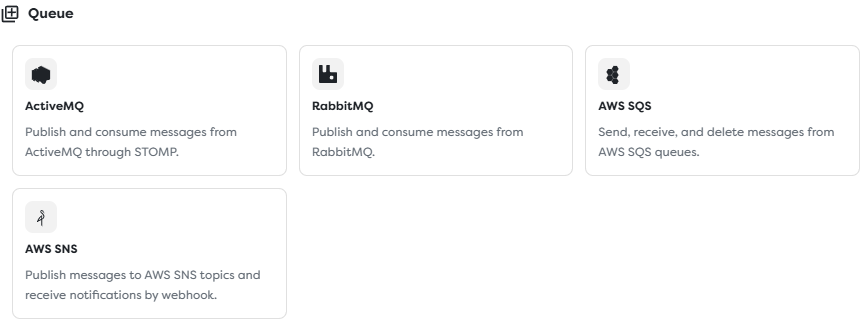
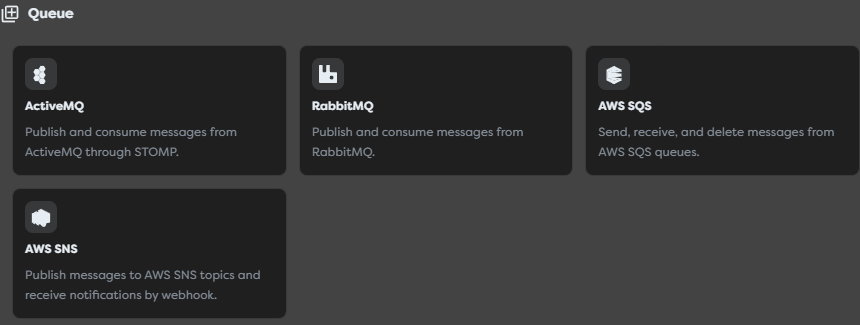
Choose the provider that owns the message source:
| Provider | Connection | Trigger source | Completion identity |
|---|---|---|---|
| ActiveMQ | STOMP or STOMP over TLS | Queue or topic configured on the integration. | Broker message or acknowledgement identifier when exposed. |
| RabbitMQ | AMQP or AMQP over TLS | Queue configured on the integration. | AMQP delivery tag and delivery context when exposed. |
| Amazon SQS | AWS API polling | Full queue URL in one AWS region. | Receipt handle used to delete or change visibility. |
| Amazon SNS | Signed HTTP/HTTPS webhook | Confirmed subscription for the integration callback URL. | HTTP acceptance of the notification; there is no SQS-style receipt handle. |
RabbitMQ, ActiveMQ, and SQS are consumer-backed sources. SNS pushes notifications to a webhook. A successful connection to one model does not validate the configuration of another.
Prepare an ActiveMQ integration
ActiveMQ uses the broker's STOMP connector. Complete these fields in Integrations > ActiveMQ:
| Field | Purpose | Required |
|---|---|---|
| STOMP broker URL | Broker endpoint using stomp:// or stomp+ssl://. | Yes |
| Username | Optional STOMP authentication identity. | With password |
| Password | Optional STOMP authentication secret. | With username |
| Default queue | Queue destination such as /queue/registrations. | Queue or topic required |
| Default topic | Topic destination such as /topic/events. | Queue or topic required |
| Prefetch | Maximum number of messages the consumer may receive before acknowledgement, when honored by the broker adapter. | No |
Enable the appropriate STOMP connector on the broker and allow the Builders network path to reach it. Use TLS for traffic that crosses an untrusted network. Grant the broker account only the consume, acknowledge, and destination permissions required by the workflow, plus send permission if Queue Action will publish.
Review the ActiveMQ Classic STOMP documentation for connector, destination, acknowledgement, and prefetch behavior.
Prepare a RabbitMQ integration
RabbitMQ uses an AMQP connection and consumes the integration's configured queue.
| Field | Purpose | Required |
|---|---|---|
| Connection URL | Sensitive amqp:// or amqps:// URL containing host, port, credentials, and virtual host. | Yes |
| Exchange | Optional default exchange for Queue Action publishing. Empty selects the default exchange where supported. | No |
| Queue | Default queue consumed by Queue Trigger and read operations. | Yes |
| Routing key | Optional default routing key for publishing. | No |
| Prefetch | Maximum number of unacknowledged deliveries allowed for the consumer. | No |
Create a dedicated RabbitMQ user and virtual host where practical. Grant configure permission only when Builders must declare or modify topology; otherwise limit the account to the required read and write patterns. Confirm that the queue exists and is bound to the intended exchange and routing keys.
See RabbitMQ access control and consumer acknowledgements and publisher confirms for the broker-side model.
Prepare an Amazon SQS integration
Amazon SQS uses AWS API polling rather than a provider callback.
| Field | Purpose | Required |
|---|---|---|
| Region | AWS region containing the queue, such as eu-central-1. | Yes |
| Queue URL | Complete SQS queue URL copied from the AWS console or API. | Yes |
| Access key ID | IAM credential identifier authorized for this queue. | Yes |
| Secret access key | Secret paired with the access key ID. | Yes |
| Custom endpoint | Optional SQS-compatible endpoint, for example LocalStack. | No |
For a trigger-only integration, restrict IAM access to the queue and the receive, visibility, delete, and queue-metadata operations required by the adapter. Add send permission only when Queue Action must publish to the same queue. Prefer short-lived role credentials where the deployment supports them; otherwise rotate stored access keys and monitor their use.
The example integration uses http://localhost:4566/000000000000/hack-it-up-registrations as a LocalStack-style placeholder. It is not a live queue and its example credentials are invalid.
Prepare an Amazon SNS integration
Amazon SNS uses a webhook subscription rather than queue polling. Configure Region, the complete Topic ARN, AWS access credentials, and an optional custom endpoint. The Topic ARN region must match the configured region.
The optional Webhook secret is for compatible custom senders. Native AWS SNS messages are verified using the AWS signature information in the notification.
Save the integration once and reopen it to obtain its stable webhook callback URL. Create an HTTP or HTTPS subscription for that URL on the intended topic, then complete the SNS subscription confirmation. AWS does not send normal notifications until the endpoint is confirmed. See Sending SNS messages to an HTTP/HTTPS endpoint and the subscription confirmation format.
The AWS credentials stored on an SNS integration are used for supported outbound API operations such as publishing. Inbound native SNS authenticity is based on the signed webhook envelope, not on the access key being included in the request.
Configure Queue Trigger
Drag Queue Trigger from Triggers onto the Designer canvas and open its settings.
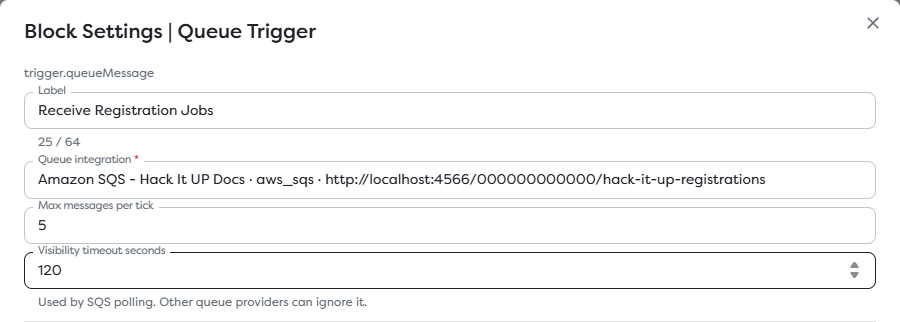
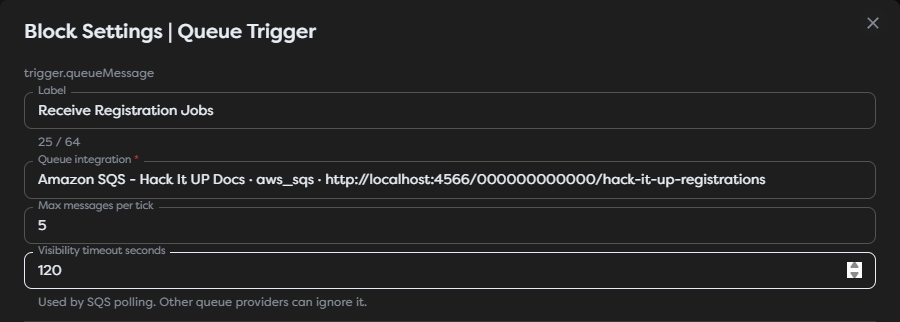
Configure these fields:
| Field | Behavior |
|---|---|
| Queue integration | Selects the accessible ActiveMQ, RabbitMQ, AWS SQS, or AWS SNS integration that owns the source. |
| Max messages per tick | Caps how many messages the trigger requests or accepts in one polling cycle. A provider can return fewer. This is not a workflow concurrency guarantee. |
| Visibility timeout seconds | Sets the temporary invisibility period used by SQS polling. Other queue providers can ignore it. |
The example uses a maximum of five messages per tick and a 120-second SQS visibility timeout. Choose values from measured processing behavior, downstream capacity, provider quotas, retry goals, and the number of active consumers.
If the trigger is unavailable, disable Hide unavailable blocks and inspect its availability message. Queue Trigger requires at least one compatible queue integration in the project's personal or team ownership scope.
Set the SQS visibility timeout
Receiving an SQS message does not remove it from the queue. SQS makes it temporarily invisible and returns a receipt handle. The message must be deleted with a current receipt handle after successful processing, or it becomes visible again when the timeout expires.
Set Visibility timeout seconds long enough for the intended processing and completion path. A timeout that is too short can make the same message visible while the first run is still active. A timeout that is too long delays recovery after a failed or abandoned run.
Amazon documents that SQS uses at-least-once delivery and can still deliver a message more than once. Visibility is not a uniqueness guarantee. Review Amazon SQS visibility timeout before selecting production values.
For variable or long-running work, design an explicit visibility-extension strategy supported by the integration or split the work into smaller queued stages. Configure a dead-letter queue and redrive policy for messages that exceed the permitted receive count.
Connect the incoming path
Connect the trigger's Out port to the first validation or normalization block. During development, use a Render Block with {{input}} and enqueue one controlled registration message.


The example edge is labeled Queued registration. After inspecting provider output, replace or extend the Render Block with JSON parsing, Conditions, registration storage, notifications, or an explicit Queue Action completion step.
Inspect normalized input
The exact input depends on the provider, destination type, message format, and Builders adapter. Start with {{input}} instead of assuming that an SQS, AMQP, STOMP, and SNS event share the same paths.
Common values to locate include:
| Data group | Typical values |
|---|---|
| Body | Text, JSON string, binary encoding metadata, or the SNS Message value. |
| Message identity | Broker message ID, SQS MessageId, or SNS MessageId. |
| Source | Queue, topic, exchange, routing key, topic ARN, region, or provider name. |
| Properties | Message attributes, headers, content type, correlation ID, subject, timestamp, and provider metadata. |
| Delivery state | Redelivery flag, receive count, delivery tag, acknowledgement ID, or SQS receipt handle when exposed. |
| SNS envelope | Type, TopicArn, Subject, Message, Timestamp, SignatureVersion, and subscription metadata. |
A body that looks like JSON may still be a string. Parse and validate it before accessing fields. For an event such as a Hack It UP registration, validate required values such as registration ID, attendee email, event ID, schema version, and creation timestamp before performing external effects.
Treat message bodies, headers, attributes, subjects, routing keys, and filenames as untrusted input. Do not interpolate them directly into SQL, commands, file paths, HTML, or privileged API requests.
Understand acknowledgement and deletion
Provider completion is not represented by one universal operation:
| Provider | Successful completion concept | Failure or missing completion |
|---|---|---|
| RabbitMQ | Acknowledge the delivery tag on its delivery channel. | Reject or negatively acknowledge with the intended requeue behavior; a lost channel can cause redelivery. |
| ActiveMQ STOMP | Acknowledge the message according to the subscription's acknowledgement mode. | Missing or negative acknowledgement can cause broker redelivery according to subscription and broker policy. |
| Amazon SQS | Delete the message using its current receipt handle. | The message becomes visible after its visibility timeout and can be received again. |
| Amazon SNS webhook | Return a successful HTTP response for the signed notification. | SNS retries according to its delivery policy; no receipt handle is returned. |
Queue Action exposes Acknowledge / delete message and accepts a Receipt handle / delivery tag for providers that support explicit completion. Pass the exact provider value from the trigger or a supported read operation. Do not construct, truncate, cache across receives, or substitute a message ID for a receipt handle.
Verify the acknowledgement boundary with a controlled failure test for the selected adapter. Confirm whether the delivery is completed when Builders accepts the trigger event, when an explicit Queue Action runs, or at another documented runtime boundary. A successful downstream block is not by itself proof that the provider removed or acknowledged the original delivery.
For SNS, the webhook response controls provider delivery. Downstream workflow failure can occur after SNS has already received a successful callback response, so use idempotency and an internal durable handoff when the business event must not depend on synchronous workflow completion.
Control prefetch and intake
Prefetch belongs to the ActiveMQ or RabbitMQ integration. Max messages per tick belongs to Queue Trigger. They solve different problems.
- Prefetch limits deliveries that can be outstanding or buffered by a broker consumer before acknowledgement.
- Max messages per tick limits intake requested by one trigger polling cycle.
- Neither setting directly limits the total number of workflow runs active across versions, replicas, consumers, or projects.
Start with conservative values for slow workflows. Increase them only after measuring processing time, memory use, external API limits, run concurrency, queue age, and redelivery. RabbitMQ explains how acknowledgement windows and prefetch affect throughput in its consumer acknowledgement guide. ActiveMQ documents its STOMP activemq.prefetchSize behavior in the STOMP reference.
Design for duplicates and ordering
Make every external effect idempotent. Build a deduplication key from a stable business event ID when one exists, otherwise combine provider message identity with source context.
Do not rely on body text alone. Two valid registrations can have identical content, while a redelivery can contain the same provider message ID and receive metadata that changed.
Ordering depends on provider and topology:
- multiple RabbitMQ or ActiveMQ consumers can process deliveries concurrently;
- standard SQS queues provide at-least-once delivery and best-effort ordering;
- SQS FIFO ordering is scoped by message group and still requires correct deletion and deduplication design;
- SNS ordering and deduplication depend on topic type and the subscribed endpoint.
If order matters, include a sequence or entity version in the message and reject stale updates at the state store. Do not assume that run start time or completion time is the producer's business order.
Publish and test a live message
Queue-backed live execution requires a published pipeline version.
- Test the integration connection and destination access.
- Save the Queue Trigger and its first validation or Render Block.
- Publish the intended pipeline version.
- Publish one uniquely identifiable message to the configured queue or topic.
- Open the resulting published run and inspect the trigger output.
- Confirm the provider-side acknowledgement, deletion, retry, or HTTP delivery result.
- Repeat with a controlled downstream failure and verify redelivery behavior.
For SNS, also confirm that the webhook subscription is no longer pending and targets the callback of the same integration selected by the trigger.
The screenshots use a placeholder LocalStack SQS URL and invalid credentials, so no live queue message was consumed while taking them.
Secure queue access
- Keep AMQP URLs, broker passwords, AWS access keys, webhook secrets, receipt handles, and delivery tags out of logs and screenshots.
- Use TLS and certificate validation for remote AMQP and STOMP brokers.
- Restrict broker users, virtual hosts, destinations, IAM policies, topic policies, and queue policies to the required operations and resources.
- For SNS, validate native AWS signatures and do not trust
SigningCertURLvalues without the required AWS validation rules. - Separate development, staging, and production queues or topics to prevent test workflows from consuming production work.
- Apply encryption, retention, access, and deletion policies to message bodies and dead-letter queues.
Custom endpoints such as LocalStack are appropriate for controlled test environments. Do not point a production integration at an arbitrary SQS- or SNS-compatible endpoint without reviewing its authentication, TLS, signing, durability, and data-location behavior.
Troubleshoot queue runs
- Queue Trigger is unavailable: create an accessible ActiveMQ, RabbitMQ, AWS SQS, or AWS SNS integration in the project's ownership scope.
- The integration test cannot connect: verify DNS, port, protocol scheme, TLS, credentials, virtual host or region, network allowlists, and custom endpoint reachability.
- RabbitMQ receives nothing: confirm the queue name, virtual host, bindings, routing key, permissions, and whether another consumer is taking the messages.
- ActiveMQ receives nothing: confirm that STOMP is enabled, the URL uses the STOMP connector port, the queue or topic destination is correct, and the account can subscribe.
- SQS receives nothing: compare region and complete queue URL, IAM permissions, custom endpoint, queue policy, and whether another consumer deletes messages first.
- SQS messages repeat while runs are active: increase or extend the visibility timeout and make processing idempotent; do not treat visibility as a uniqueness lock.
- SQS messages never retry promptly: inspect an excessively long visibility timeout, receive count, redrive policy, and dead-letter queue.
- SNS subscription remains pending: inspect the integration callback, confirmation event,
SubscribeURLhandling, topic policy, endpoint reachability, and subscription status. - SNS notifications are rejected: inspect AWS signature validation, topic ARN, region, certificate URL validation, request body preservation, and HTTP response logs.
- The body cannot be addressed as JSON: inspect its runtime type, parse the string, validate its schema, and then reference the parsed object.
- Acknowledgement fails: pass the current receipt handle or delivery tag from the same provider delivery and integration; do not pass the message ID.
- The same business effect happens twice: store an idempotency key atomically before performing the external effect and test the provider's redelivery path.
- The expected field is missing: inspect
{{input}}from the actual provider and use Designer autocomplete instead of copying paths from another queue type.
Next steps
- Queue Integrations
- Trigger Blocks
- Use Template Expressions
- Read Block Logs and Output
- Run Published Workflows
The next article will cover Issue Trigger.