
Twilio SMS Trigger
Use a Twilio SMS Trigger to start a published workflow when Twilio delivers an inbound SMS or MMS message. Builders receives the provider webhook through the callback URL assigned to a Twilio SMS integration and sends the normalized message context through the trigger's Out port.
This article uses the separate Documentation - Twilio SMS Trigger pipeline in the Hack It UP - event project. Its example path receives an event-registration message and sends the complete input to a Render Block for inspection.
Prepare the Twilio resources
Create or select the Twilio account, SMS-capable phone number, and optional Messaging Service that will receive messages. The Twilio Messaging API documentation covers the provider resources used by Programmable Messaging.
Collect these values before creating the Builders integration:
| Builders field | Twilio value | Required |
|---|---|---|
| Account SID | The account identifier beginning with AC. | Yes |
| Auth token | The account Auth Token used for API authentication and webhook signature validation. | Yes |
| From number | An SMS-capable Twilio number in E.164 format, such as +12025550123. | Optional |
| Messaging Service SID | The Messaging Service identifier beginning with MG. | Optional |
Use a From number when outbound Twilio SMS Action blocks should send from one specific number. Use a Messaging Service when Twilio should select a sender from the service's sender pool. A trigger can receive messages without both optional outbound defaults, but the provider still needs an inbound-capable sender routed to the Builders callback.
Keep the Auth Token private. It grants API access and participates in validating Twilio webhook signatures.
Create the Builders integration
Open Integrations, create a Twilio SMS integration, and provide a recognizable integration name with the Twilio credentials. Assign the integration to the same personal or team ownership scope as the project.
Save the integration once, then reopen it. Builders now displays its stable Webhook callback URL.
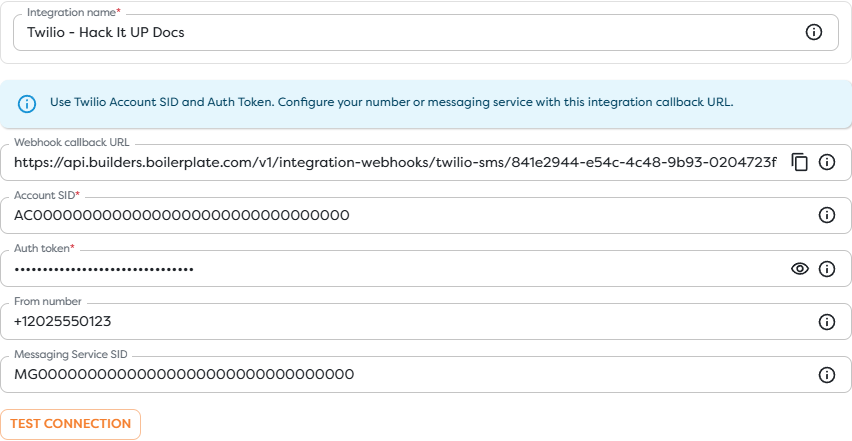
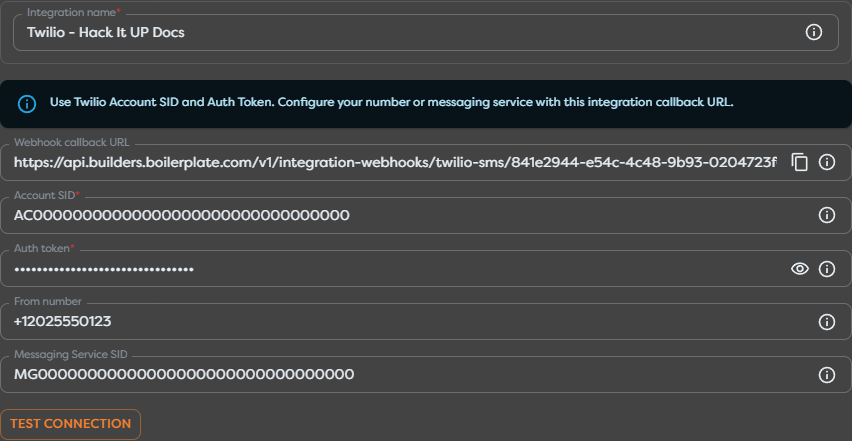
The integration separates provider access from workflow logic:
- Account SID and Auth token authenticate Twilio API access and inbound request validation.
- From number is the default direct sender for outbound SMS actions.
- Messaging Service SID lets outbound actions use Twilio's sender pool and service configuration.
- Webhook callback URL is the inbound target registered in Twilio.
Use Test connection only with real credentials. A successful test confirms that Builders can authenticate to Twilio. It does not prove that a phone number or Messaging Service sends inbound webhooks to the callback URL.
Route inbound messages to Builders
Copy the complete callback URL from the saved Builders integration. Do not shorten it, alter its case, append query parameters, or expose it as an outbound delivery-status callback.
For a Twilio phone number:
- In the Twilio Console, open the SMS-capable number.
- Find its messaging configuration.
- Set A message comes in to Webhook.
- Paste the Builders callback URL.
- Select
HTTP POSTand save the number.
Twilio sends incoming message data as application/x-www-form-urlencoded parameters. See Twilio's incoming-message webhook request for the complete provider field reference.
When the sender belongs to a Messaging Service, check the service's Integration settings. A service can defer incoming messages to each sender's webhook or use one service-level webhook. Configure the callback at the level that actually owns inbound routing. Twilio's Messaging Services documentation explains the difference.
Do not confuse the incoming-message webhook with a Delivery Status Callback. The incoming webhook starts this trigger when a user sends a message to Twilio. A status callback reports state changes for an outbound message and does not represent a new inbound SMS.
Configure Twilio SMS Trigger
Drag Twilio SMS Trigger from Triggers onto the Designer canvas and open its settings. Give the block a meaningful label and select the Twilio SMS integration whose callback was configured above.


The trigger has one provider setting: Messaging integration. Phone number, sender, body, and keyword filters are not configured on this block. Twilio routing decides which inbound messages reach the integration callback; downstream blocks decide which delivered messages continue through the workflow.
If the block is unavailable, disable Hide unavailable blocks and read its availability message. Twilio SMS Trigger requires an active Twilio SMS integration accessible within the project's ownership scope.
Connect the incoming path
Connect the trigger's Out port to the first block that should inspect or normalize every message. During development, use a Render Block with {{input}} so a controlled run reveals the complete Builders payload before templates depend on individual paths.


The example edge is labeled Incoming SMS. After confirming the payload, replace or extend the inspection step with validation, conditions, database writes, event registration logic, AI processing, or a Twilio SMS Action.
Inspect the incoming message
Twilio includes provider fields in each incoming-message webhook. Builders may normalize or nest them, so treat the names below as values to locate in the trigger output rather than guaranteed template paths.
| Provider field | Meaning |
|---|---|
MessageSid | Unique 34-character message identifier beginning with SM. |
AccountSid | Twilio account that received the message. |
MessagingServiceSid | Messaging Service associated with the message when one is used. |
From | Sender phone number or channel address. |
To | Receiving Twilio number or channel address. |
Body | Message text; Twilio documents a maximum of 1600 characters for this webhook field. |
NumSegments | Number of SMS segments used by the message. |
NumMedia | Number of media items attached to the message. |
MediaUrl{N} | URL of an attached media item, indexed from 0. |
MediaContentType{N} | MIME type paired with the indexed media URL. |
Start with {{input}}, publish the workflow, send one controlled message, and inspect the Render Block output. Then use Designer autocomplete to replace broad inspection with exact expressions from that run.
Do not build new templates around deprecated aliases such as SmsSid or SmsMessageSid. Twilio includes them for backward compatibility; use the normalized value corresponding to MessageSid when it is available.
Normalize and filter messages
Add a Condition or Transform block immediately after the trigger when only part of the inbound traffic should continue. Useful checks include:
- an allowlist of destination Twilio numbers or Messaging Service SIDs;
- supported sender countries or phone-number patterns;
- a required command, registration code, or message prefix;
- maximum body length and allowed character content;
- whether
NumMediais zero or the attached MIME types are supported; - whether the sender has already completed the business action.
Treat message text, media URLs, filenames, and provider metadata as untrusted input. Validate values before using them in code, database queries, file paths, HTML, AI prompts, or privileged provider actions.
SMS messages can be split into several billable segments even though the workflow receives one logical message. Preserve NumSegments when cost or message-length monitoring matters.
Reply through Twilio
Add a Twilio SMS Action after validation when the workflow should respond. Select the same integration and use its reply behavior when the action should address the sender from the inbound message context.
Before enabling a reply path:
- Confirm the exact sender and recipient paths from a real trigger run.
- Prevent the workflow from replying to unsupported or blocked senders.
- Apply consent, opt-out, quiet-hours, and regional messaging requirements.
- Keep the reply concise and account for SMS segmentation.
- Record the inbound
MessageSid, outbound message SID, and Builders run ID for correlation.
Do not assume that accepting an inbound webhook proves delivery of an outbound reply. Outbound delivery is a separate lifecycle reported by Twilio message status and optional status callbacks.
Publish and test a live message
Inbound Twilio events start live runs only for the published pipeline version. Save the graph and publish the intended version before sending the provider event.
- Confirm that the Twilio integration passes Test connection.
- Confirm that the intended phone number can receive SMS in the sender's country.
- Verify that the active incoming-message route contains the complete Builders callback URL and uses
POST. - Publish the pipeline version containing Twilio SMS Trigger.
- Send one message with a unique marker, such as
Hack It UP registration 2026-08-20. - Open the resulting published run and inspect the trigger and first downstream block.
Compare the message SID, sender, recipient, body, segment count, and media count with the Twilio message log. A Designer test run or successful Twilio SMS Action does not verify inbound webhook routing.
The screenshots in this guide use a demonstration integration with non-working placeholder credentials. They document the Builders fields and workflow shape; they do not represent a successful connection or live SMS delivery.
Handle media and duplicate effects
When NumMedia is greater than zero, expect indexed pairs such as MediaUrl0 and MediaContentType0. Check every item against an allowlist of MIME types and enforce file-size and processing limits before downloading it. Do not trust a media URL or content type solely because it arrived through a messaging webhook.
Use the message SID as the provider identity for deduplication. Before creating a registration, sending a reply, charging an account, or performing another external effect:
- Build a key from the Twilio account context and message SID.
- Check whether the business effect already completed.
- Record the key atomically with that effect when possible.
- Preserve the Builders run ID for investigation.
Do not deduplicate by sender and body alone. A person can legitimately send the same text more than once.
Secure the webhook
Twilio signs inbound requests with the X-Twilio-Signature header. The signature depends on the account Auth Token, the exact webhook URL, and the delivered request parameters. Builders owns validation at its integration callback, so keep the correct Auth Token in the integration and keep the registered callback URL unchanged.
Twilio can add webhook parameters over time. Do not place a proxy in front of the Builders callback that drops fields, rewrites the URL, or changes form values before validation. Twilio's secure webhook guide explains its signature mechanism and evolving parameter set.
Rotate a compromised Auth Token in Twilio and immediately update the Builders integration. Re-test provider access and send a new inbound message before returning the workflow to normal traffic.
Troubleshoot Twilio SMS events
- Twilio SMS Trigger is unavailable: create an active Twilio SMS integration in the same personal or team scope as the project, then reload Designer.
- Test connection fails: verify the Account SID and Auth Token, confirm that they belong to the same account, and replace any expired or rotated token.
- No callback URL appears: save the integration once, reopen it, and copy the generated URL from the configuration step.
- A message reaches Twilio but creates no run: confirm the number or Messaging Service's active incoming-message route,
POSTmethod, exact callback URL, and published pipeline version. - The wrong webhook receives the message: check whether the Messaging Service defers to the sender's webhook or overrides it with a service-level route.
- A delivery status event was expected to start the trigger: configure the incoming-message webhook; status callbacks describe outbound delivery instead.
- The sender cannot message the number: verify the number's SMS capability, geography, account restrictions, trial-account rules, and applicable registration requirements in Twilio.
- The payload path is missing: inspect
{{input}}from a real published run and use autocomplete instead of assuming raw Twilio field placement. - MMS fields are absent: check
NumMedia; indexed media fields are present only when the inbound message contains media. - A reply uses the wrong sender: review the integration's From number and Messaging Service SID, then inspect the Twilio SMS Action configuration.
- The same external effect occurs more than once: deduplicate by account context and message SID before performing it.
- Twilio rejects the callback response or reports a webhook error: inspect the Twilio message log and debugger, then match its request time and message SID to the Builders run history.
Next steps
- Trigger Blocks
- Use Template Expressions
- Read Block Logs and Output
- Run Published Workflows
- Messaging Integrations
The next article will cover Signal Trigger.