
Authentication for Public Workflows
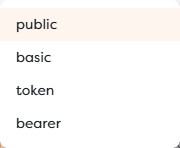
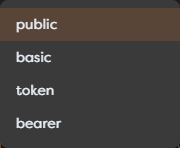
Authentication determines who can start a public workflow and which identity, if any, the workflow may trust. Builders exposes two related models: Endpoint Trigger uses its own protected-token switch, while Web Form and Chat triggers offer Public, Basic, Token, and Bearer verification modes.
Authentication does not replace authorization inside the workflow. A valid credential proves only what the configured mode and issuer establish. The workflow must still verify that the resolved caller may read a record, change a booking, upload a file, or perform another protected action.
Compare the surface models
| Surface | Available access model | Credential transport |
|---|---|---|
| Endpoint Trigger | Public or protected with the generated endpoint token | Authorization: Bearer or x-trigger-token |
| Web Form Trigger | public, basic, token, or bearer | Browser or trusted client behavior required by the selected mode |
| Chat Trigger | public, basic, token, or bearer | Hosted access or trusted host application for protected embedding |
The word bearer has two different product contexts. For Endpoint Trigger, the Bearer value is the endpoint's own configured secret. For a form or chat in Bearer mode, Builders sends the supplied token to the configured external verification service and reads the user identifier from its response.
Use Public mode deliberately
Public mode accepts a visitor without a configured shared credential. Use it for low-risk information, event registration, feedback, or public support only when anonymous traffic is expected.
Before selecting Public:
- remove access to personal or confidential records;
- require verified identity before account-specific actions;
- validate all input server-side;
- configure trigger rate limits and upstream controls where appropriate;
- make writes idempotent and abuse-aware;
- monitor accepted volume, rejected traffic, run failures, storage, and budget.
A private-looking URL is not authentication. URLs can be copied, logged, indexed, forwarded, or discovered through browser history.
Configure Endpoint protection
Keep Require authentication enabled in Endpoint Trigger and copy the generated token into the calling service's secret store. A protected call can use either header:
curl "$BUILDERS_ENDPOINT_URL" \
--header "Authorization: Bearer $BUILDERS_ENDPOINT_TOKEN"
curl "$BUILDERS_ENDPOINT_URL" \
--header "x-trigger-token: $BUILDERS_ENDPOINT_TOKEN"
Do not include the token in a query string or path. Those values are commonly recorded in browser history, proxy logs, analytics, referrer data, and screenshots.
An endpoint-wide rate limit applies independently from the token. A valid token does not exempt traffic from the configured request count and window.
Configure Basic access
Basic mode on Web Form and Chat supports a small controlled audience with up to ten configured username/password pairs. Use separate pairs when audit or revocation needs to distinguish users. A single shared pair cannot prove which person used it.
For every pair:
- use a unique username that does not expose unnecessary personal data;
- generate a strong password outside documentation and screenshots;
- deliver it through an approved secret-sharing channel;
- remove it when access ends;
- rotate it after exposure or shared-device use.
Basic credentials are encoded for transport, not encrypted by the Basic scheme itself. HTTPS protects the connection in transit. The HTTP authentication section of RFC 9110 describes the HTTP challenge and credential framework.
Use Basic for a limited shared experience, not as a replacement for organizational identity, multi-factor authentication, or fine-grained permissions.
Configure Token access
Token mode for a Web Form or Chat requires the configured secret in:
x-auth-token: <access-token>
This is suitable for a trusted application or proxy that can add a custom header. Normal address-bar navigation and ordinary hyperlinks do not add x-auth-token, so a token-protected hosted page can fail even when the URL itself is correct.
Do not place the token in:
- the hosted URL or query string;
- public HTML or a generated chat snippet;
- a frontend JavaScript bundle;
- browser-visible application configuration;
- workflow logs, output, screenshots, or support messages.
When a browser-facing application must use Token mode, keep the secret on a trusted backend or use the Builders runtime mounting contract with credentials obtained securely for the visitor.
Configure Bearer verification
Bearer mode delegates token validation to an external verification endpoint. Configure the verification request and the dot path that identifies the verified user; the default user-ID path is sub.
The expected flow is:
visitor sends Authorization: Bearer <token>
-> Builders calls the configured verification service
-> verification service accepts or rejects the token
-> Builders reads the configured user-ID path
-> accepted request starts the workflow with resolved identity metadata
The verification service must check the properties required by its identity system, such as signature, issuer, audience, expiry, revocation, and intended scope. Builders reading sub does not make an otherwise unverified token trustworthy.
Use a stable identifier rather than an email address when the identity provider offers one. Validate that the resolved value is present and of the expected type. Minimize verification-response data and do not forward the caller's raw token into workflow input or logs.
Account for browser and embed behavior
Browser navigation can participate in Basic authentication, but it does not let a hyperlink attach arbitrary Token or Bearer headers. Protected forms and chats may therefore require a trusted host application, backend-for-frontend, or the current Builders mounting API.
For embedded Chat:
- allow only the exact host origins that need the widget;
- obtain credentials at runtime for the current visitor;
- keep long-lived shared secrets out of browser code;
- test CORS preflight and the production Content Security Policy;
- clear application-side credential state on logout.
An allowed origin controls which browser origins may embed or call the surface. It is not caller authentication. The MDN CORS guide explains origins, permitted headers, and preflight requests.
Test authorization failures first
For every protected public workflow, test this matrix against the published version:
| Request | Expected result |
|---|---|
| No credential | Rejected before protected workflow effects |
| Wrong password or token | Rejected without leaking which secret detail was wrong |
| Expired or revoked Bearer token | Verification rejects it |
| Valid token but missing user-ID path | Rejected as incomplete identity |
| Valid identity without business permission | Workflow returns a controlled authorization denial |
| Valid identity and permission | One expected run and effect |
| Credential from disallowed embed origin | Browser access is blocked according to origin policy |
Inspect both the public response and Builders Logs. A safe failure should not create a database write, email, AI call, file disclosure, or other protected effect.
Rotate credentials without an outage
Plan rotation as a client migration:
- Inventory every caller or host application using the current credential.
- Prepare the new credential without exposing it in workflow drafts or logs.
- Update the Builders trigger and publish the intended version at the agreed time.
- Update callers through their secret-management process.
- Test unauthorized and authorized requests against the published surface.
- Revoke or remove the old credential once all callers are confirmed.
- Review Logs for continued attempts with the old value.
If the product mode supports only one active shared token, coordinate publication and caller deployment as one maintenance change. Do not leave the old value documented as a fallback.
Bearer verification keys and issuer configuration are normally rotated according to the identity provider's mechanism. The verification service, not workflow prompt logic, owns that trust decision.
Respond to credential exposure
- Replace or revoke the exposed value immediately.
- Publish the corrected trigger configuration when required.
- Search application, proxy, CI, browser, and Builders logs for exposure and misuse.
- Identify affected callers and distribute the replacement securely.
- Review runs, file access, database changes, integrations, and budget during the exposure window.
- Remove the value from source history and artifacts; deleting one visible line is not sufficient when the secret was committed.
Troubleshoot protected access
| Symptom | Check |
|---|---|
| Endpoint rejects a known token | Current published version and selected Authorization or x-trigger-token header |
| Basic user cannot enter | Username/password pair, current published version, and browser credential cache |
| Token form works in an API client but not a link | Links cannot attach x-auth-token; use a trusted client or proxy |
| Bearer request is rejected | Header format, verification service availability, token validity, and user-ID dot path |
| Embedded chat is blocked | Allowed origin, preflight headers, CSP, and runtime credential mounting |
| Authorized user sees another user's data | Workflow-level resource authorization is missing or uses an untrusted identifier |