Processing Blocks
Processing blocks change, inspect, delay, combine, or forward data after a trigger starts a workflow. They cover short runtime utilities, custom code, database and HTTP operations, deterministic JSON shaping, parallel-path synchronization, and reusable child pipelines.
Choose the right block
| Block | Schema type | Use it when |
|---|---|---|
| Sleep | debug.sleep | A path must pause for a fixed duration before it continues. |
| Render Block | debug.render | A value must be rendered as text, JSON, XML, HTML, an image, or a PDF. |
| Code | process.code | A transformation or operation needs JavaScript or TypeScript logic. |
| DB Query | process.dbQuery | A workflow must execute a parameterized PostgreSQL or MySQL query, or a MongoDB command. |
| Web Request | process.webRequest | A workflow must call an HTTP API and route success or error results. |
| Transform | process.transform | Input values must be shaped into a predictable JSON object without custom code. |
| Wait for all | process.waitForAll | Several required paths must all finish before one combined payload is emitted. |
| Subflow | flow.subflow | A published pipeline in the same project owns a reusable part of the process. |
Choose the narrowest block that expresses the operation. Prefer Transform for declarative JSON mapping, Web Request for a normal HTTP exchange, and DB Query for a configured database. Use Code when the required logic cannot be represented clearly by those blocks.
Understand data flow
Most processing blocks receive the upstream payload as input. Their output then becomes the next block's input. Some blocks preserve the incoming value and add a result, while synchronization blocks construct a new object from explicitly mapped inputs.
| Pattern | Blocks | Output behavior |
|---|---|---|
| Pause or inspect | Sleep, Render Block | Continues with the upstream context and block-specific result. |
| Add a named result | Transform, DB Query | Preserves upstream input and adds a configured or block-specific key. |
| Return custom data | Code | Preserves upstream input and adds the JSON value returned by run. |
| Call an external service | Web Request | Emits a success result through Out or a request failure through Error. |
| Join paths | Wait for all | Emits one object built from the configured input-to-output mappings. |
| Compose pipelines | Subflow | Starts the selected child pipeline and follows the selected completion mode. |
Inspect a controlled test run before writing expressions against a result. A green block state confirms execution, but it does not prove that the returned business data is correct.
Plan side effects and cost
Designer tests are real executions. Code can call runtime APIs, DB Query can change records, Web Request can call production endpoints, and a Subflow can execute an entire published pipeline. Reached blocks can consume credits even when the run was started for testing.
Before running a processing path:
- Save the workflow version.
- Use non-sensitive representative input.
- Point integrations at controlled resources.
- Confirm whether retries could repeat a side effect.
- Inspect each reached block's logs and output.
Combine blocks deliberately
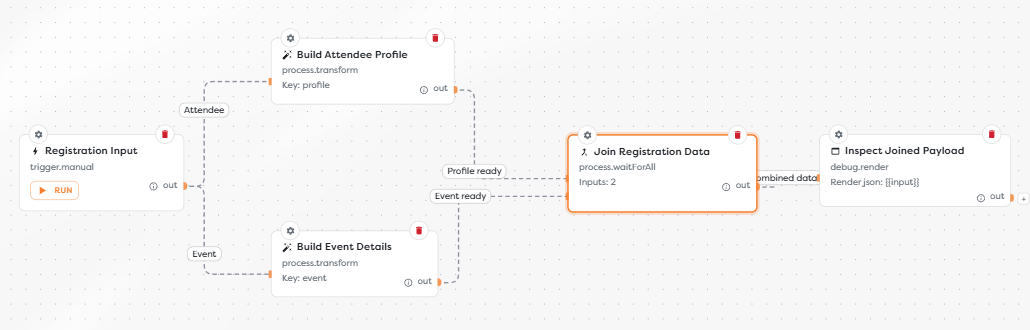
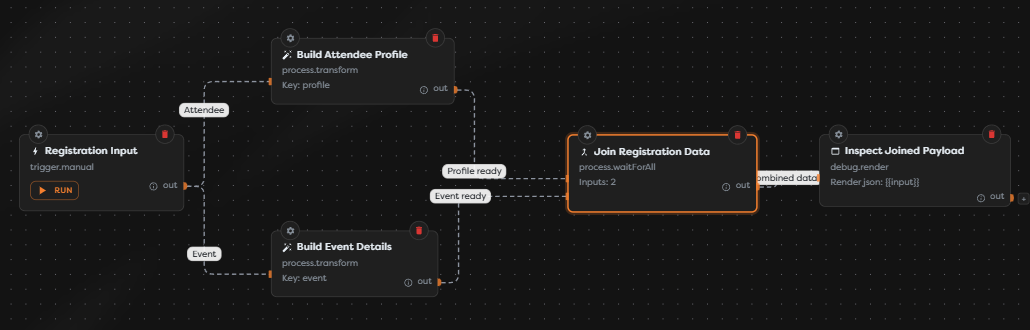
A common event-registration path can use:
- Transform to build a stable attendee object.
- Web Request to create the attendee in another application.
- DB Query to record a local correlation ID.
- Wait for all to join independent attendee and event branches.
- Render Block to inspect the final object during development.
Use a Subflow when one part has independent ownership, release cadence, or reuse. Do not split a simple linear mapping into another pipeline solely to reduce the number of blocks on the current canvas.
Troubleshoot processing paths
- A block never runs: verify that an upstream output reaches its input and that a condition did not select another path.
- A template path is missing: inspect the previous execution output and match exact nesting and letter casing.
- An external operation is unavailable: configure the database, integration, or target pipeline in the same project ownership scope.
- A retry duplicates work: make the external operation idempotent or use a stable business identifier as its idempotency key.
- Parallel work never joins: confirm that every configured Wait for all input is connected and can complete in the tested path.
- A Subflow target is absent: publish a manual-trigger pipeline in the same project, then reopen the block settings.
Processing guides
- Sleep - Configure bounded fixed delays and distinguish a pause from scheduling or polling.
- Render Block - Select a render type, source expression, and MIME type for inspectable output.
- Code - Implement a serializable
runfunction and use the Builders Runtime API through dedicated references. - DB Query - Select a configured engine, parameterize queries, and inspect rows or command results.
- Web Request - Configure methods, URL data, bodies, files, redirects, timeouts, and retries.
- Transform - Build a named JSON value with template expressions.
- Wait for all - Define dynamic input handles and combine parallel results by key.
- Subflow - Select a published child pipeline and choose synchronous or asynchronous execution.